Ask a team that has been writing agent skills for a few months how those skills are doing, and you'll usually hear some version of three complaints. The agent ignores the skill when it should use it ("Custom skills are not reliably auto-triggered" is a Claude Code issue title). The skills are eating tokens. And nobody can say which ones actually help: one feature request for skill analytics put it plainly, that it's "difficult to evaluate the value of custom skills."
Uber just published how it answers all three at scale. How Uber Evals 1 Million Agent Skill Invocations a Month (November 23) describes a shared marketplace that grew from one skill in October 2025 to more than 5,000 a year later, with agents calling those skills more than a million times in a month across Claude Code, Codex, OpenCode and Uber's own agent.
Most teams are nowhere near that. A typical setup has five or twenty skills, written by whoever needed one. But the problems Uber describes show up long before 5,000 skills, and almost everything they built has a smaller version a team can run on tools it already has. This post walks through Uber's approach piece by piece, then shows how we'd run each part on GitHub and Azure.
What an agent skill is
A skill packages one workflow: a runbook, a team's process, or a job an expert does by hand. Uber's examples range from editing a ticket to a full root-cause analysis.
On disk it's a folder. The SKILL.md file inside has a name, a description and the instructions, and scripts and reference files can sit beside it. The format is an open specification, and it isn't tied to one vendor: Claude Code, OpenAI Codex, Cursor and OpenCode read it, and so does GitHub Copilot, in the Copilot CLI and its cloud agent among other places.
What makes skills cheap is that the agent loads them in three stages:
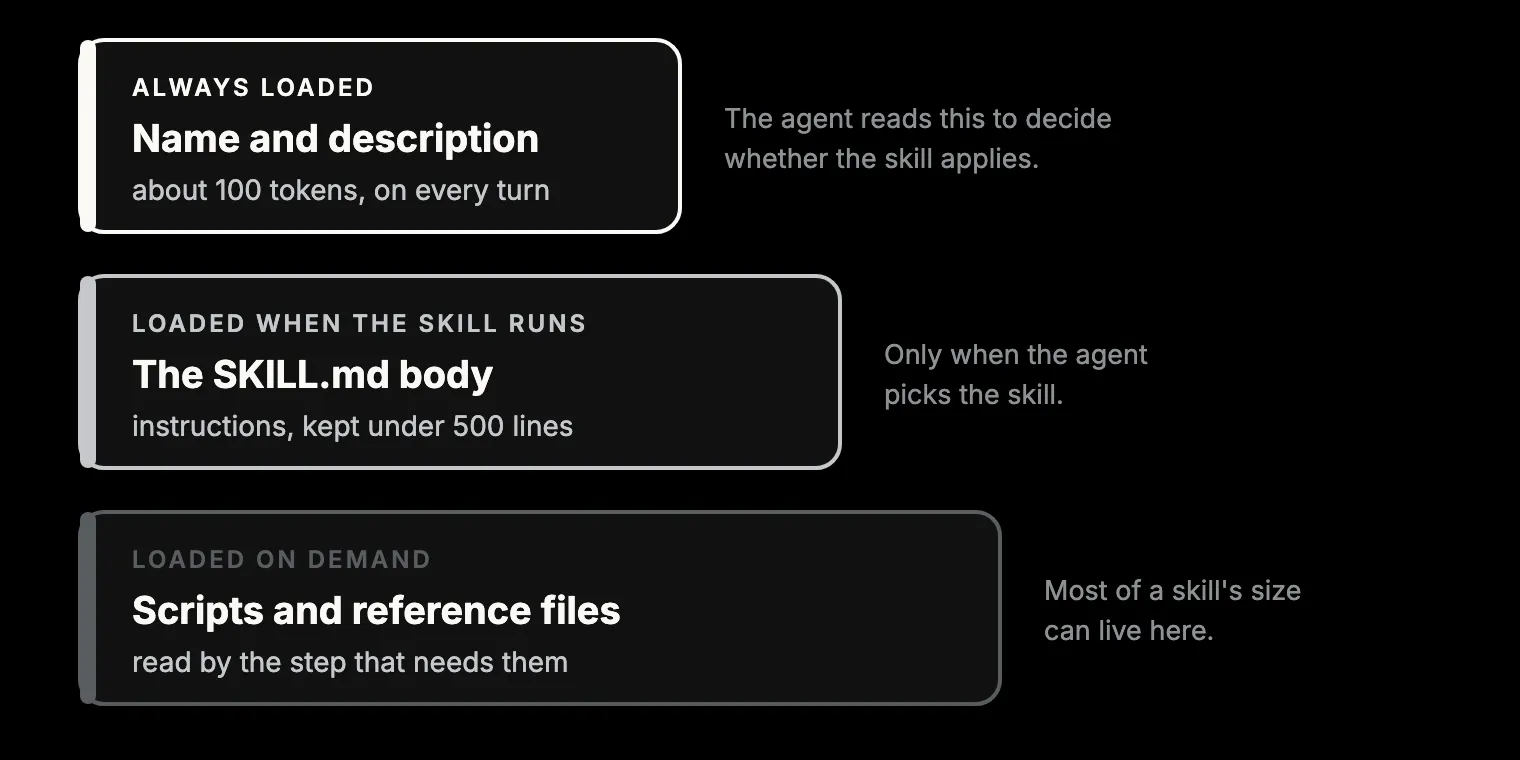
That first layer is the catch. A team with fifty skills pays for fifty descriptions in every session, whether or not any of them run. And because the description is all the agent sees when choosing, a vague one is a common reason a skill doesn't trigger.
Uber's approach, piece by piece
1. One repository for every skill
Uber keeps every skill in one Git repository, because version control already gives each skill an owner, a review and a history. They split it into three tiers, and the bar rises as a skill moves up:
- Domain: any team can start its own area, name its reviewers and publish after one peer approval and a CI check.
- Core: widely used skills that a team maintains and tests, and the platform team reviews every change.
- Always-on: about 100 broadly useful skills switched on for everyone, so a new starter has them on day one.
A command-line tool installs the same skills into whichever agent a person starts, so someone switching between Claude Code, Codex and OpenCode keeps the same set.
On GitHub: this is a repository with a folder per tier and per team. A CODEOWNERS file names the owner of each skill's folder, and a ruleset on the main branch requires that owner's review plus a passing check. Claude Code can install plugins from a marketplace that lives in a GitHub repository, and Copilot reads the same SKILL.md files, so one repository can serve both. Most teams won't need an always-on tier on day one. They do need an owner for every skill, because a skill without one never gets fixed.
2. Measure who uses what
Uber collects usage events from hooks in each agent with OpenTelemetry. Each event records the skill, its version and whether the agent chose it or the person typed its command. The events carry no prompt text and no file contents. From them Uber computes twelve measures per skill, including users, retention, cost, latency and errors, and shows them to the author on the skill's page.
On Azure: Claude Code exports OpenTelemetry metrics and events, and its cost and token counters can carry the skill's name. Custom skill names are replaced with a placeholder unless you set OTEL_LOG_TOOL_DETAILS=1, so check that before you build a dashboard. The OpenTelemetry Collector has an Azure Monitor exporter (beta) that sends metrics, logs and traces to Application Insights. That puts skill usage next to the rest of your monitoring, with the same access controls and retention. If you don't have a collector yet, the session logs Claude Code keeps on each machine already hold the token counts, which is where we started (more on that below).
3. Lint skills before they ship
Uber turned what made good skills good, and what caused problems, into a linter with pass-or-fail checks. The three they highlight:
- Steps are numbered, and each has one objective that can be checked.
- Each step gives a concrete command and checks its result before the next step.
- The skill has an error-recovery section: a table of failures and their fixes. "Try again" doesn't count.
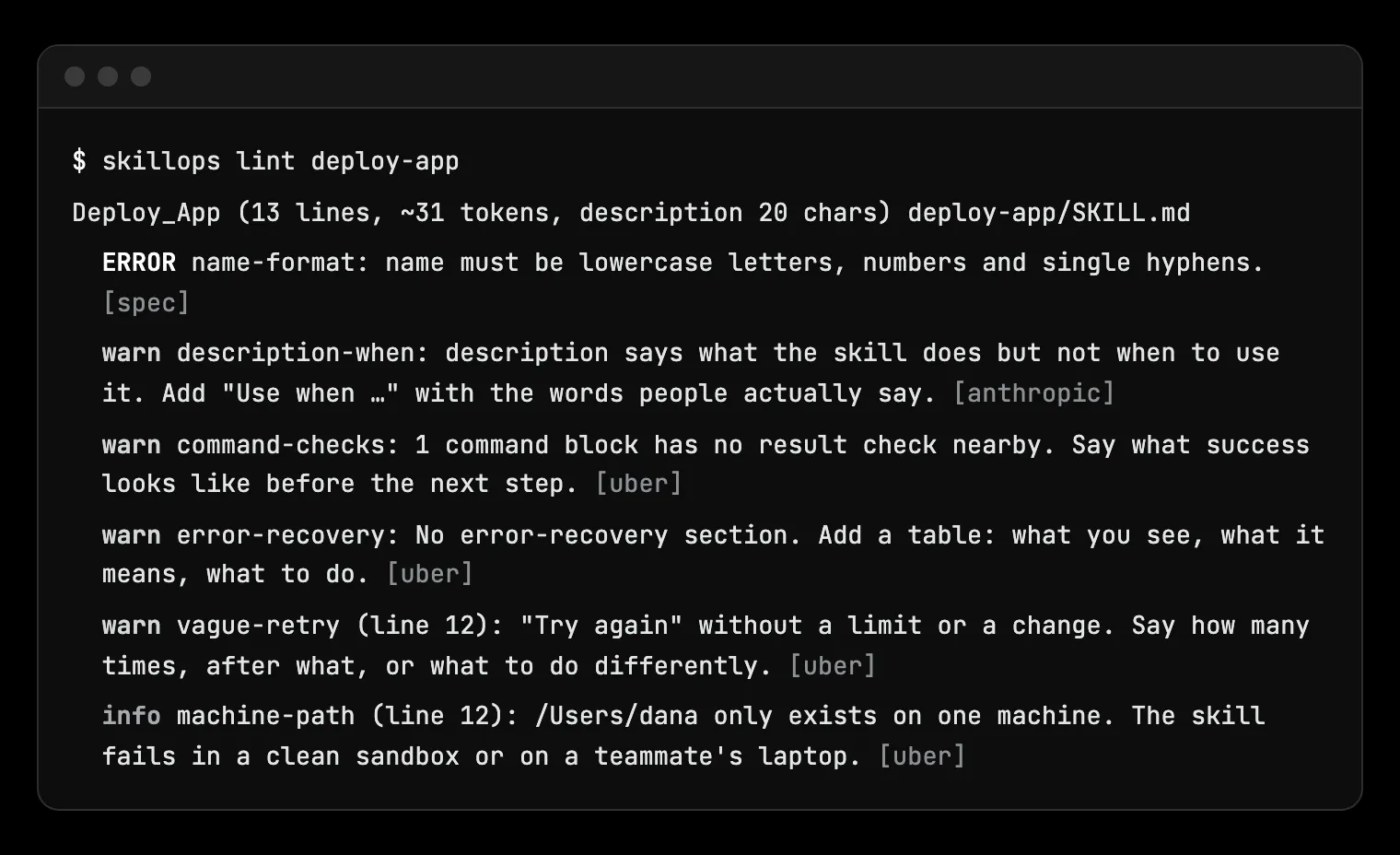
On GitHub: run the linter as a required check in GitHub Actions on every pull request that touches a skill, next to Anthropic's own claude plugin validate, which checks the files' structure. A skill with a broken link, no error-recovery table or a path from someone's laptop then never reaches the main branch.
4. Evals with real prompts
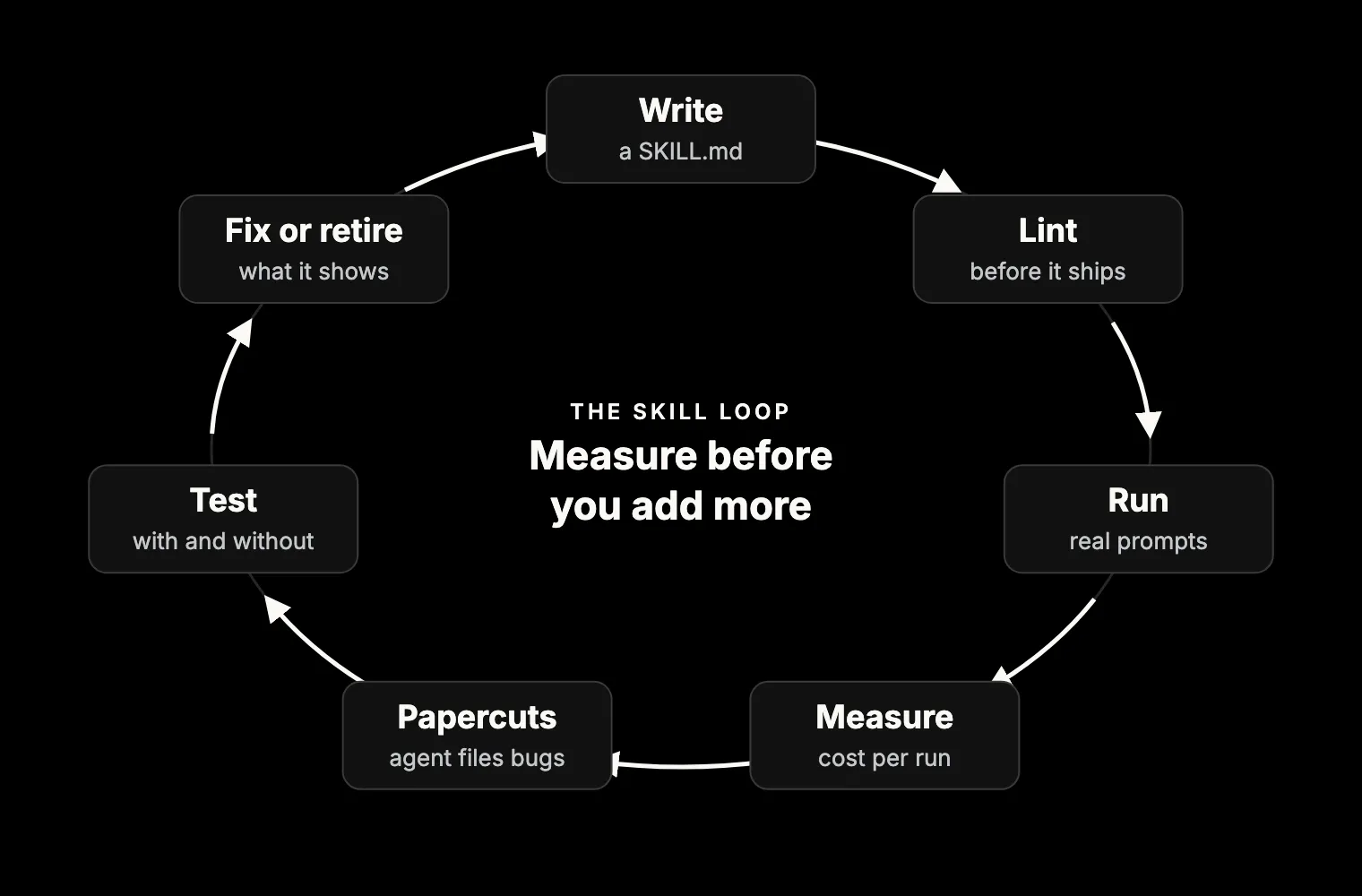
Uber's guidance for a skill's eval suite is about 5% golden cases (a fixed input and expected output, with tools mocked), 80% real prompts graded on trajectory, and 15% judged by the author. Trajectory means whether the agent used the right skills and tools in the right order, not only whether the final answer looked right.
Three lessons from that section are worth repeating:
- Test in a clean room. Uber runs evals on remote machines and sandboxes, not the author's laptop. That found skills that expected particular file paths, cached documents or tools only installed on one machine.
- Don't aim for 100%. Evals that pass 70% to 90% of runs can be more useful than ones that always pass, because a suite that never fails may be missing real changes in the answer.
- A model judge needs human examples. An LLM judge works best when it has a set of answers people have already graded, and someone has to build that set.
On GitHub: Anthropic's claude plugin eval runs each case in a throwaway workspace with a fresh configuration, runs it again without the plugin, and reports the difference, with a score threshold and a cost ceiling for CI. A GitHub-hosted runner is a clean room by default: nothing from anyone's laptop is on it. Run the suite when a skill changes and on a schedule, so a model update that breaks a skill shows up before people notice.
5. Test with and without the skill
Uber also tests by taking things away. They replay real prompts once with a skill and once without, and a blind judge picks the better answer. They also test with parts of a skill removed, because as models get better, more words can make a skill worse. Each result has a noise band: how much two identical runs differ.
In most cases the skill made the session more successful and cheaper. The biggest wins came from skills that gave the agent something it couldn't easily find, such as internal documents or a way to run warehouse queries. In the warehouse-query test, sessions without the skill made 13% more tool calls, had six times as many tool errors and took 31% longer, and the answer with the skill won 87% of the comparisons.
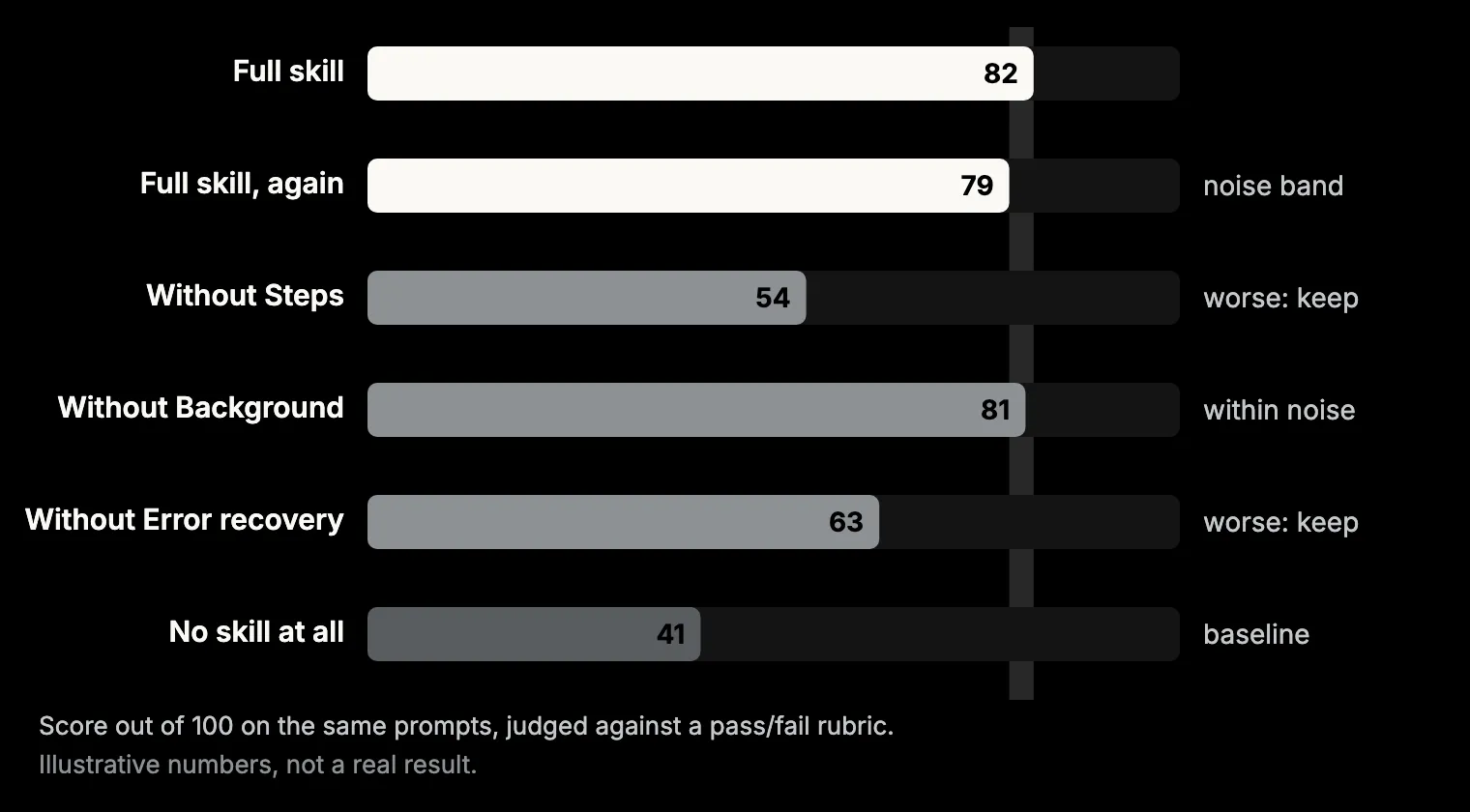
Our take: this is the test most teams skip, and the one that tells you when to delete a skill. claude plugin eval already runs the with-and-without comparison for a whole plugin. Running it once more for each section removed, plus once more with nothing changed to get the noise band, shows which parts of a skill earn their place.
6. Know what each skill costs, then cut it
Uber measures a skill's cost from the session's running total: the last total before the skill call, subtracted from the first total after it. They add those up per skill per day and divide by the number of calls. Then they pull four levers:
- Use code, not the model, for steps that never change. Scripts are cheaper, easier to test and more reliable for deterministic work.
- Run the skill in a worker on a cheaper model. The bulky tool output stays in the worker and only a short summary comes back. That cut one tracing skill's cost per run by 46%. A deployment skill showed no drop in its first week, which is why they measure every change.
- Run the script when the skill loads. When a result is small and always needed, putting it straight into the prompt saves a model turn. One search skill went from four turns to three and its mean cost fell 32%.
- Move polling out of the main session. In their 20 highest-spend sessions, notification turns were about a third of the spend, so they moved pull-request polling to a background agent on a cheaper model.
They also call out tool servers. A default MCP install loads every tool's full description into every call, and with more than 100 tools those definitions took 50,000 to 70,000 tokens before anyone typed a word. Inspired by Cloudflare's Code Mode, they moved their busiest flows into scripts that call tools through a gateway, and they block .mcp.json files, which install tool servers, inside skills.
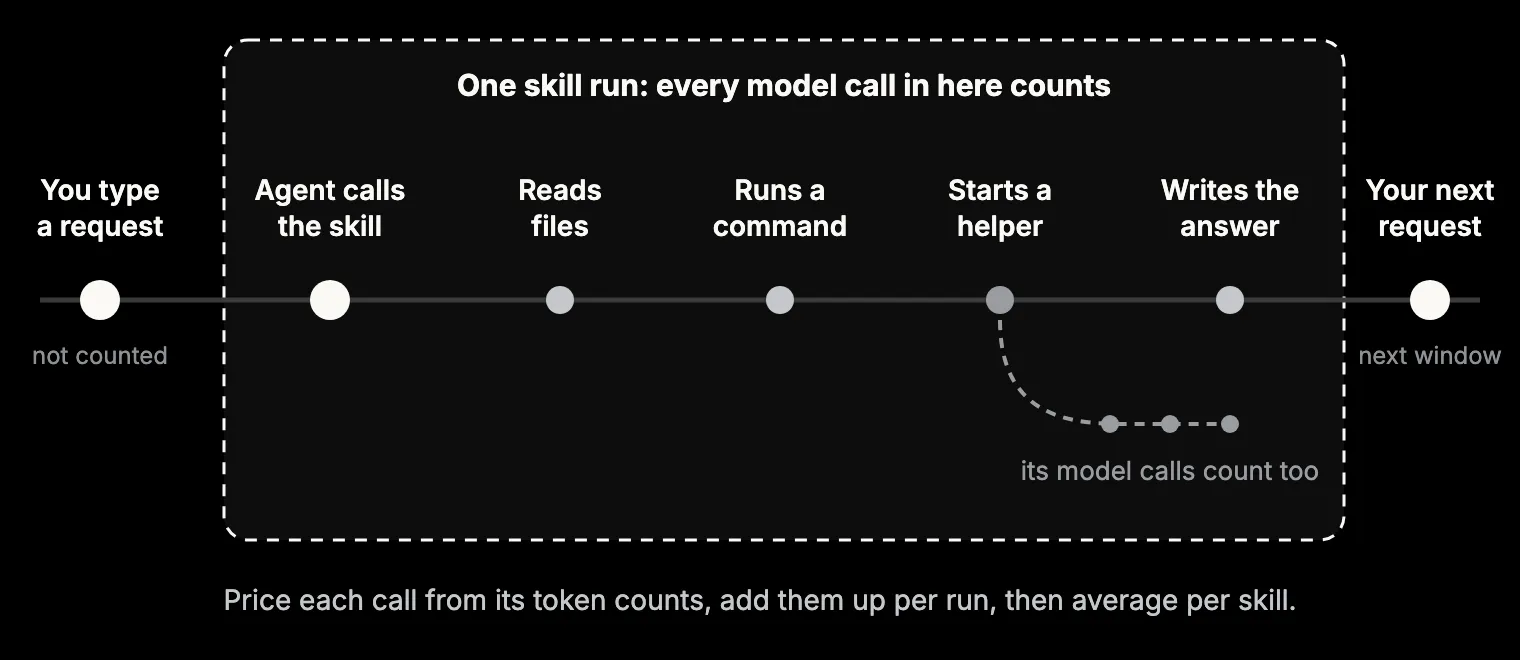
Our take: Claude Code logs token usage for every model call rather than a running total, so we count a run differently: every call from the skill call until the next thing the person types, including helper agents the skill started. Priced at list prices, that gives cost per run without any telemetry set up. The four levers apply as they are. If your agents run on Microsoft Foundry, the worker lever means giving helper agents a smaller model deployment. Measure each skill before and after, as Uber did, because not every skill gets cheaper.
7. Let the agent file the bugs
This is the part of Uber's post we like most. An agent usually knows when a skill isn't working: a flag the help text lists that the tool rejects, a command that exits 0 on an error, a query that returns nothing when it should. It can often work around it, but it burns tokens and context doing so, and the next session hits the same thing.
So Uber gave every agent an always-on skill, log-papercut, that files a short report: what the agent tried, what it expected, what happened and what would fix it. Reports land on one dashboard, grouped by skill. Agents filed thousands in three months, and hundreds have been fixed. Their examples will look familiar:
- A pull-request skill wrote its commit message to a shared temporary file, so two sessions changed each other's pull requests.
- A deployment skill told the agent to pass seconds where the API expected milliseconds.
- A configuration lookup returned a different property, with no error, when the key didn't exist.
- A pull-request skill waited for CI checks on a repository that has none, and repeated the same 404 until it timed out.
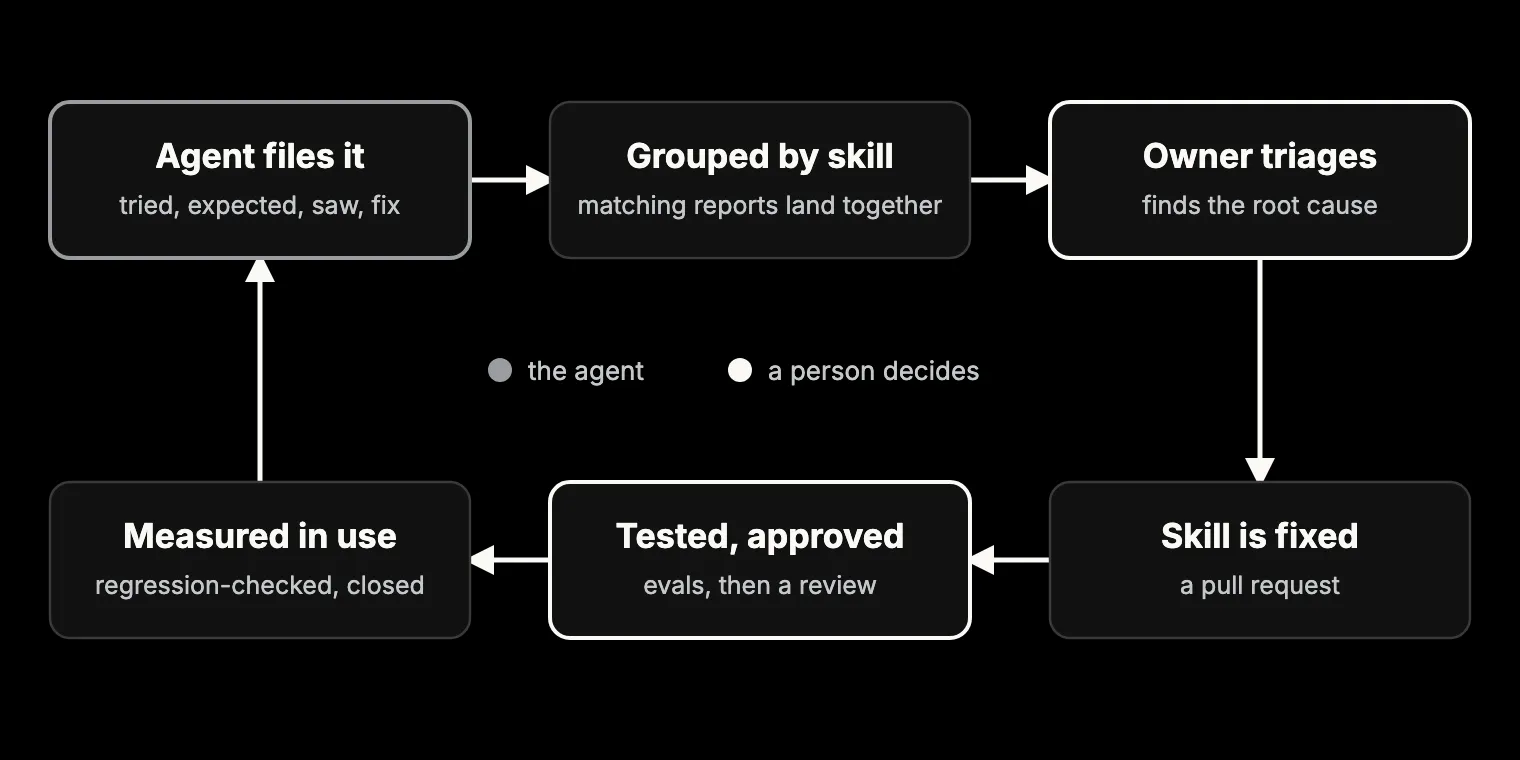
On GitHub: a papercut is a GitHub issue with a label for the skill. The same CODEOWNERS file that names a skill's reviewer tells you who owns its papercuts, and the fix arrives as a pull request that the lint check and evals run on. No new dashboard needed.
Uber also feeds human signals back in. Their automated code-maintenance skills open pull requests, and when a pull request draws review comments or isn't accepted, that's used to improve the skill, and the blocked pull request becomes an eval case. Pull requests opened by GitHub Copilot's coding agent or Claude Code give you the same signal for free.
8. Write the spec first
Uber starts each skill from a short spec: its goal, its outputs, the tool actions that are required or forbidden, and the agents and models it targets. Their authoring tool compiles the SKILL.md and its test prompts from that spec, and recompiles them when a model or an agent changes. The spec keeps the intent stable while the wording underneath changes with each model.
You don't need a compiler to get most of the value. A spec.md beside each skill, reviewed like code, gives evals something to test against and gives the next model upgrade something to check.
What Anthropic already ships
Before building anything, check what's in the box. Anthropic has covered a lot of this for Claude Code:
claude plugin evalruns test cases with your plugin and without it, judges each run against a rubric, and reports the difference. It gates CI with a threshold and a cost ceiling (docs).- The skill-creator skill benchmarks a skill against a baseline, compares two versions blind, and tunes the description so the skill triggers when it should (anthropics/skills).
/skill-doctorshows each skill's context cost and how often it's used, and flags skills that have never run (docs).- OpenTelemetry metrics in Claude Code can break cost and tokens down by skill name, if you run a telemetry backend (docs).
What's missing is the loop that ties those together: cost per run from the sessions you've already had, papercuts, and finding out which sections of a skill earn their tokens.
What we found on our own skills
We built a small internal toolkit to fill those gaps and ran it on my own Claude Code sessions first. It reads the session logs Claude Code already keeps on disk, so there was nothing to set up.
The first check was whether the cost maths is right. Claude Code records its own cost total for each session, so we priced the same tokens with Anthropic's list prices and compared. Across 30 sessions, our figure came within 1% of Claude Code's own for Claude Opus 5.5.
Then we looked at where each skill's cost and trouble came from. Three patterns stood out:
- The research skill's cost was almost all in the helper agents it starts, not in the skill itself. That's where a cheaper worker model would pay off, which is the same lever Uber found.
- The mail skill was cheap but hit tool errors in two of its three runs. I hadn't noticed, because the agent recovered each time. That's exactly what a papercut report would have caught as it happened.
- None of our in-house skills had an error-recovery section. Every failure meant the agent improvising, which is slower and less predictable than a table that says what to do.
None of this needs Uber's scale. It needs someone to look.
Five questions to ask about your skills
If your team has more than a handful of skills, try answering these:
- Which of your skills haven't run in the last month? If you can't say, you're paying for their descriptions in every session anyway.
- What do your five most-used skills cost per run? Not per month: per run, including the helper agents they start.
- When a skill's command fails, does the skill say what to do next? Or does the agent improvise?
- Where do the agent's complaints about your skills go? If the answer is "nowhere", the same failures repeat.
- Would the model do as well without the skill? Models improve every few months. A skill that helped in the spring can get in the way by winter.
If you answered "don't know" to two or more, start there. None of these needs a big platform to fix.
A free review of your skills
Send us your skills folder (the SKILL.md files and the scripts beside them, nothing else) and we'll send back a short report: every skill checked against the Agent Skills specification, Anthropic's authoring guidance and the checks Uber describes, with the problems listed in the order we'd fix them. We don't need your session logs or access to your systems for this. Send us a message to ask for one, or take the free self-check on the Agent Skills Review page first.
If you want to go further, measuring cost per run from your own sessions, setting up papercut reports and testing skills with and without each section, that's the Agent Skills Review, a fixed-fee engagement.
Kevin Evans
 Founder, Code To Cloud Inc.
Kevin Evans is a Microsoft MVP for Azure. He and the Code To Cloud team build Azure platforms for enterprise and mid-market teams, from developer platforms to AI agents in production. He spent nearly five years at Microsoft, rising to Senior Solutions Engineer, and is a CNCF Ambassador and Calgary chapter lead, based in the Calgary area, Alberta. More about Kevin
Frequently Asked Questions
What is an agent skill?
A skill is a folder with a SKILL.md file: a name, a description that tells the agent when to use it, and instructions, plus optional scripts and reference files. The format is an open specification, and Claude Code, OpenAI Codex, Cursor, OpenCode and GitHub Copilot all read it.
Where should a team keep its agent skills?
In one Git repository, so every skill has an owner, a review and a history. On GitHub, a CODEOWNERS file names the owner of each skill's folder, rulesets require that owner's review, and the same repository can be published as a Claude Code plugin marketplace.
How do you measure what an agent skill costs?
Add up the model calls a skill causes, from the moment the agent calls it until the next prompt the person types, including any subagents it starts. Claude Code's session logs record token usage for every call, so you can work this out after the fact without setting up a telemetry backend first.
Does Anthropic have tools for evaluating skills?
Yes. claude plugin eval runs test cases with and without a plugin and reports the difference, the skill-creator skill benchmarks a skill and tunes its description, /skill-doctor reports each skill's context cost and usage, and Claude Code's OpenTelemetry metrics can attribute cost to a skill by name.
What is a papercut report?
A papercut is a short report the agent files when a skill's instructions were wrong or a command it gave failed: what it tried, what it expected, what happened, and the fix it suggests. Uber's agents filed thousands in three months, and hundreds have been fixed.