
Microsoft, LinkedIn Learning and GitHub each publish AI training. Ask a team to "get skilled on AI" and the first problem is knowing where to look.
The AI Skills Navigator is Microsoft's attempt at one front door for all three. This post covers what it is, what we found when we opened it, and how a team should use it. It also covers the question it doesn't answer, which is whether your organization is ready to build anything.
What's Inside
- What the Navigator is, in Microsoft's words, and when it launched
- What is on the site today, by role
- How we would use it with a team
- What it can't tell you, and a free way to find out
What it is
Microsoft released the next-generation Navigator at Ignite in November 2025 and called it "an agentic learning space." Its launch post (18 November 2025) lists what it is meant to do:
- Bring AI and cloud content and credentials from Microsoft, LinkedIn Learning and GitHub into one place.
- Recommend content based on your role, goals and learning style.
- Offer interactive sessions: videos of human instructors combined with real-time AI coaching.
- Turn learning material into AI-generated podcasts.
- Let you build custom playlists and assign them to a team, with progress tracking.
It launched as a public preview, in English only. We did not find a later announcement that it is generally available, so treat the feature list as Microsoft's description and check the site for what is live.
What is there today
We opened the site on 12 October 2026 without signing in. The page leads with role-based playlists: Executive, Developer, IT professional, Data professional, Security professional, Sales, Marketing, Customer service, Faculty, Non-profit and Student.
Each card shows a format or source (module, learning path, playlist, video, credential or LinkedIn Learning), a length and a month and year. Many also show a level, such as Beginner or Intermediate. Some playlists are marked "Created by Microsoft".
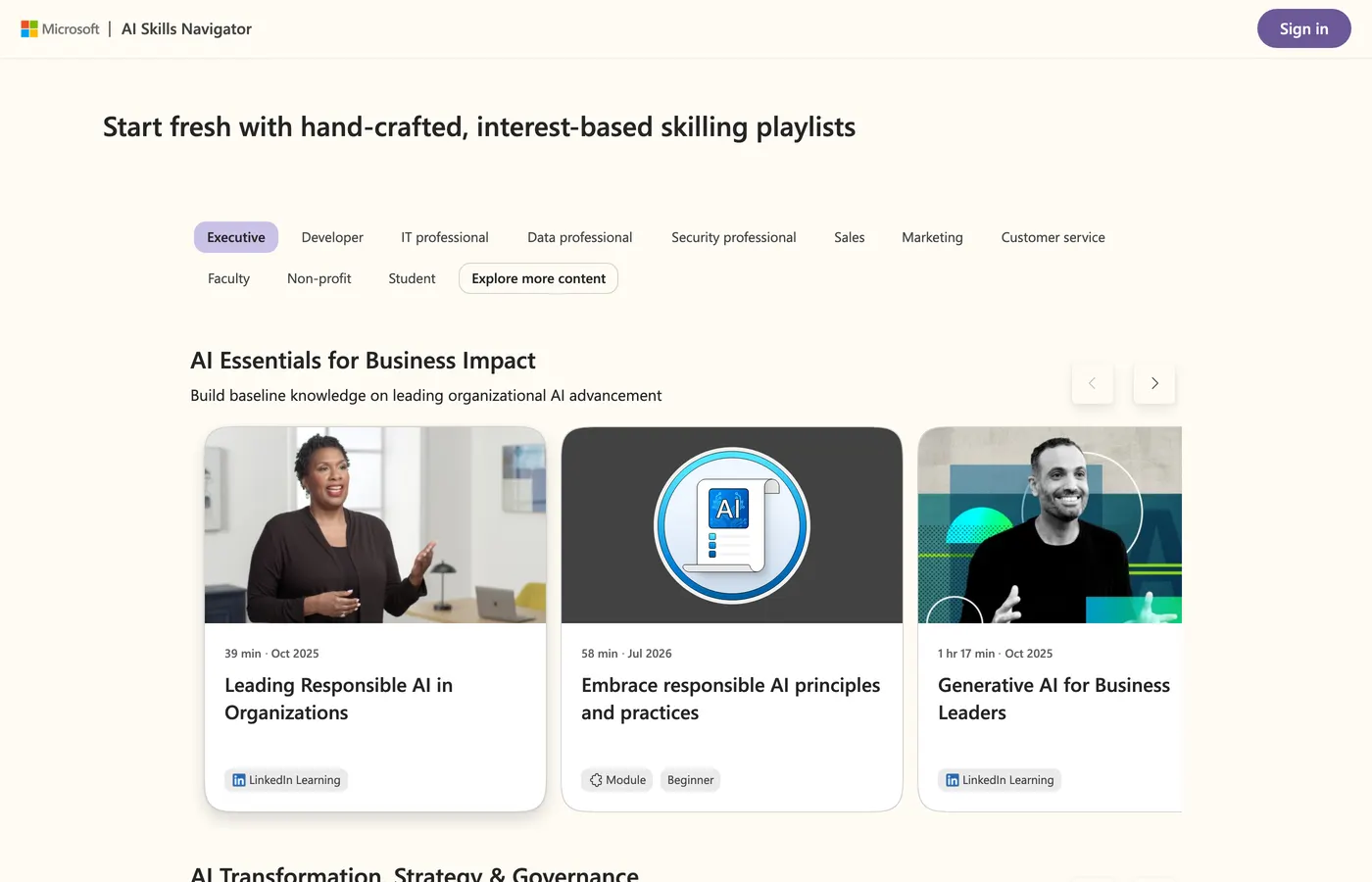
The Executive track has three rows: "AI Essentials for Business Impact", "AI Transformation, Strategy & Governance" and "Future-Focused Leadership & Trends". It includes a credential, Microsoft Certified: AI Transformation Leader, and a playlist "Created by Microsoft" called Using Copilot Agents at Work.
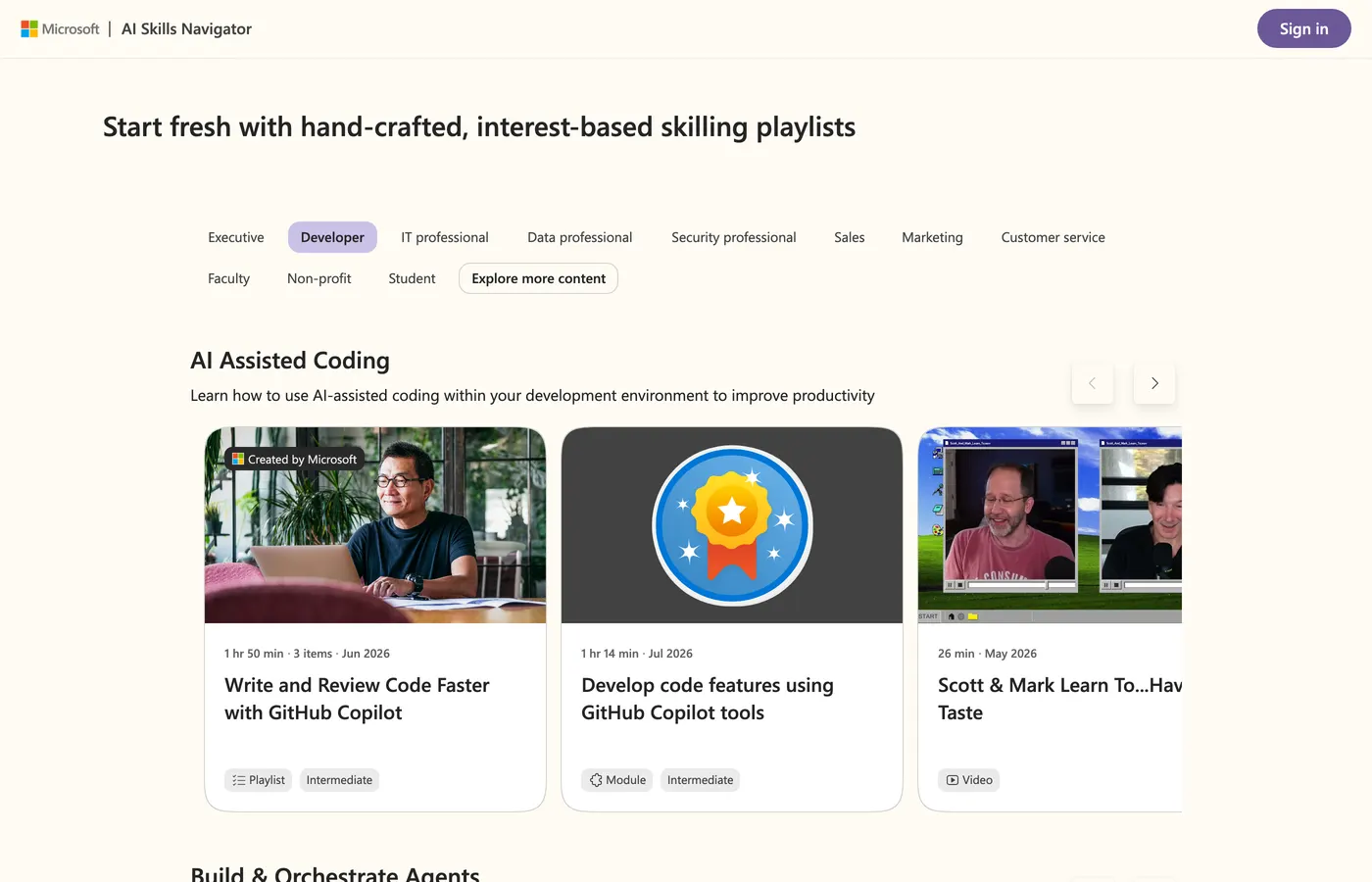
The Developer track opens with AI-assisted coding: a GitHub Copilot playlist "Created by Microsoft", a module on developing code features with Copilot tools, videos, and a GitHub Copilot credential. In the default view, a section lower on the page lists a Foundry IQ module and videos on Microsoft IQ and Agent 365.
Two things stood out. The tracks are organized by job, not by product. And every card carries a date: on the cards we looked at, they run from October 2025 to September 2026.
We did not sign in, so we did not test the personalized recommendations, the AI coaching, the podcasts or the team playlists. Treat those as Microsoft's description until you have tried them.
How we would use it
This is our judgment, not Microsoft's guidance.
- Pick by role, not by team. An executive and a developer in the same company need different first steps. The Executive track opens on AI essentials and the Developer track on AI-assisted coding, so start there and let each person move on.
- Choose a short first playlist. Several cards run under an hour. A short win beats a long course nobody finishes.
- Pair learning with a credential where it matters. Credentials such as the GitHub Copilot one give a developer something to show for the time.
- Check the date on each item. The dates we saw span almost a year, and AI tooling changes fast. Skim anything older before you assign it.
What it can't tell you
Training closes a skills gap. It doesn't tell you whether your platform is ready for what people learn to build. A team can finish every playlist and still ship its first agent without evaluation gates, identity on model calls, cost controls or a landing zone.
That is a different question. The free Agentic AI Readiness Scorecard takes a few minutes and needs no email. It maps your answers to Microsoft's own agentic maturity levels and points you to a free next step for each.
For builders: what to learn next
Once a developer is past the basics, the questions get specific. Here are two we have written up, each checked against Microsoft's own documentation:
- Foundry Local: Why to Start Your AI Build Here covers running a model on your own machine with no Azure subscription.
- Agent Memory on Azure: Redis or Cosmos DB? covers where an agent's memory and cache should live.
For the controls around all of it, use the free Agent Platform Production Checklist.
Frequently Asked Questions
What is the AI Skills Navigator?
It is Microsoft's learning site for AI skills. Microsoft describes it as an agentic learning space that brings together AI and cloud content and credentials from Microsoft, LinkedIn Learning and GitHub, with personalized recommendations.
Do I need to sign in to use the AI Skills Navigator?
Not to browse. We opened the role-based playlists without signing in on 12 October 2026. The site has a Sign in button. We did not sign in, so we did not test the personalized recommendations, AI coaching or shareable team playlists that Microsoft describes.
Is the AI Skills Navigator still in preview?
Microsoft launched it as a public preview on 18 November 2025. We did not find a later announcement of general availability, so check the site before you build a training plan around any single feature.
Sources
- AI Skills Navigator: role tracks, cards and dates as shown on 12 October 2026
- Powering career and business growth through AI-led, human-enhanced skilling experiences: Microsoft Tech Community, 18 November 2025; the source for the feature list and the public preview status
Screenshots are our own captures of a third-party site, shown with attribution. Catalog contents change, so what you see will differ.
Where to go next
- Skills sorted, platform not? Take the free Agentic AI Readiness Scorecard. It takes a few minutes and needs no email.
- Want the controls in a list? Use the free Agent Platform Production Checklist.
- Want a second pair of eyes on your agent platform? Bring your score to a Discovery Call and we will scope the Agent Platform Readiness Review with you.
Kevin Evans
 Founder, Code To Cloud Inc.
Kevin Evans leads agentic DevOps and application modernization engagements for enterprise and mid-market teams, and offers fractional CTO advisory to growing businesses. He spent nearly five years at Microsoft, rising to Senior Solutions Engineer, and is a CNCF Ambassador and Calgary chapter lead, based in Calgary, Alberta. More about Kevin
Founder, Code To Cloud Inc.
Kevin Evans leads agentic DevOps and application modernization engagements for enterprise and mid-market teams, and offers fractional CTO advisory to growing businesses. He spent nearly five years at Microsoft, rising to Senior Solutions Engineer, and is a CNCF Ambassador and Calgary chapter lead, based in Calgary, Alberta. More about Kevin