
Microsoft 365 Copilot doesn't change who can see what. Microsoft's own privacy documentation says Copilot "only surfaces organizational data to which individual users have at least view permissions." (1)
That's reassuring, and it's also the problem. Most permissions in Microsoft 365 were set when finding a file took effort: you had to know the site existed, open it and dig. Copilot removes the digging. If someone can open a file, they can now find it by asking a question.
What's Inside
- Where over-sharing usually hides in SharePoint, OneDrive and Teams
- Six questions to answer before you turn Copilot on, each with the Microsoft report or setting that answers it
- How to start a pilot before the clean-up is finished
- What your Copilot licences already include, and what they don't
A made-up example
A site was set up for a 2021 reorganization and shared with everyone in the company, so people could see the new org chart. Later, someone saved the salary planning workbook there because it was the obvious place. Nobody went looking, so nobody noticed.
On day one with Copilot, an employee asks, "What were the salary bands in the reorg?" Copilot does exactly what it's designed to do. It answers from files that person is allowed to open.
Nothing was hacked and no setting broke. The workbook was open to everyone the whole time. Copilot just made it easy to find.
Where over-sharing hides
Microsoft has a report or a policy for each of these:
- Sites and Teams shared with "Everyone except external users". Microsoft's data access governance reports include one just for this. (2)
- Sharing links that work for anyone in the organization, created years ago for one person and never removed. There's a sharing links report too. (2)
- Sites with no active owner, so nobody is reviewing who has access. SharePoint Advanced Management has a site ownership policy for exactly this. (3)
- Old sites nobody uses but that still show up in search, and now in Copilot. (3)
Six questions before you turn it on
Answer each one only if you can point to the report or setting behind it. "I think so" counts as no.
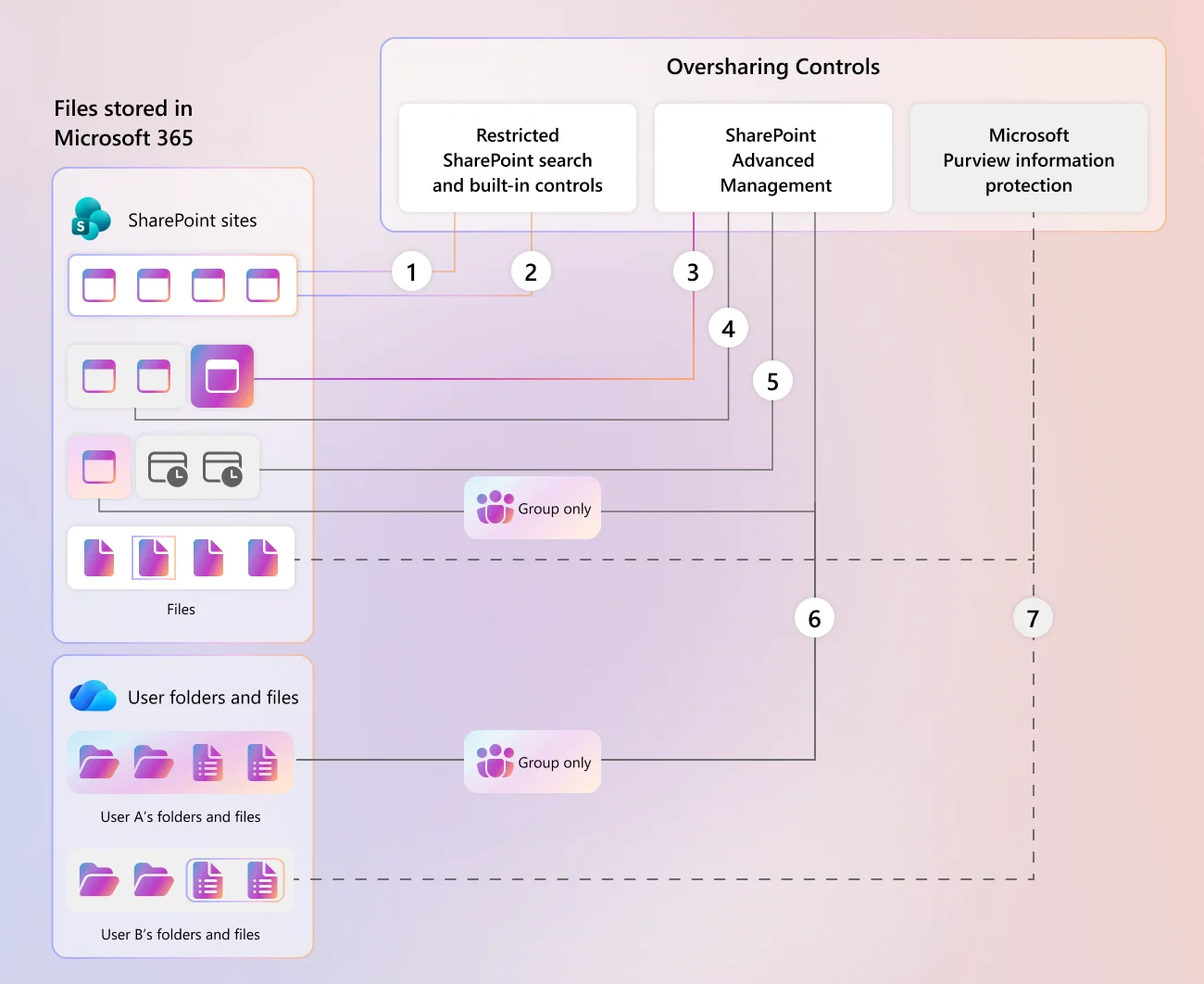
1. Do you know which sites and Teams are open to the whole organization? The data access governance reports in the SharePoint admin center list them, including the "Everyone except external users" report. (2) Microsoft Purview also runs a weekly data risk assessment of your 100 most-used SharePoint sites, with no setup needed. (4)
2. Does every site have an owner who reviews who has access? If nobody owns a site, nobody notices when it's over-shared. SharePoint can ask site owners to review access and confirm it's still right. (3)
3. Are your confidential files labelled? Sensitivity labels are how the rest of the controls know what's confidential. If the salary workbook isn't labelled, nothing downstream can treat it differently. (5)
4. Does a data loss prevention policy cover Copilot? Microsoft Purview can stop Copilot from using files and emails with certain sensitivity labels when it writes a response. Worth knowing: those items can still appear in the response's citations, but Copilot doesn't use their content. (6)
5. Is multifactor authentication enforced for everyone who will use it? Copilot works with whatever account is signed in. Microsoft's Zero Trust guidance for Copilot includes requiring MFA for all users, not only admins. (7)
6. Will you be able to see what happens after launch? Copilot prompts and responses are captured in the Purview unified audit log. (5) The Microsoft Copilot Dashboard shows whether people are actually using it. (8)
You don't need a perfect tenant to start
The clean-up can take a while, and a small pilot doesn't have to wait for it. Restricted Content Discovery stops a site from showing up in Copilot and in organization-wide search, while leaving its permissions unchanged. (9) The people who can open it today still can. Microsoft's own description has one exception worth knowing: content can still surface for someone who has recently worked with it. (3)
Our view: treat it as a way to start safely, not as the fix. The content is still over-shared until the permissions are cleaned up.
What your licences already include
Some of this is already paid for. When at least one person has a Copilot licence, SharePoint admins get many SharePoint Advanced Management features, including Restricted Content Discovery, site access reviews, permission state reports and the site ownership and inactive site policies. (3)
Not everything is included. On the same page, Microsoft notes the sensitivity labels report requires E5 or G5, and restricted site creation by apps needs the separate SharePoint Advanced Management Plan 1 add-on. (3) Check what your own plans cover before buying anything new.
Sources
- Data, privacy and security for Microsoft 365 Copilot
- Data access governance reports for SharePoint sites
- SharePoint Advanced Management features in Microsoft Copilot licenses
- Data Security Posture Management for AI (Microsoft Purview)
- Use Microsoft Purview to manage data security and compliance for Microsoft 365 Copilot
- Microsoft Purview data loss prevention for Microsoft 365 Copilot
- Apply Zero Trust principles to Microsoft 365 Copilot
- Microsoft Copilot Dashboard
- Restricted Content Discovery for SharePoint sites
Sources were checked on November 20, 2026. Microsoft changes these products often, so check the current documentation before you rely on a detail. This is general information, not legal, security or compliance advice.
Where to go next
- Want a quick read on your own tenant? Take the free nine-question self-check on our Microsoft 365 Copilot Security and Governance Review page. It needs no email.
- Want help answering these six questions, and fixing what they turn up? That's the review, and we can do the rollout after it. Book a discovery call below and we'll scope it together.
Kevin Evans
 Founder, Code To Cloud Inc.
Kevin Evans is a Microsoft MVP for Azure. He and the Code To Cloud team build Azure platforms for enterprise and mid-market teams, from developer platforms to AI agents in production. He spent nearly five years at Microsoft, rising to Senior Solutions Engineer, and is a CNCF Ambassador and Calgary chapter lead, based in the Calgary area, Alberta. More about Kevin