What's Inside
- What Azure AI Landing Zones are, and how they fit the Cloud Adoption Framework for AI
- The 10 areas of Microsoft's design checklist, with the recommendations that matter most
- Which decisions are hard to reverse and belong before the first agent
- Where the checklist is thin, and what you still have to decide yourself
Most enterprise AI programs stall on the same problem: the first agent works, and the second team builds a different, differently secured one. Azure AI Landing Zones is Microsoft's published answer to that. This post was first written in November 2025 and was rewritten on September 26, 2026 around the part of the project we find most useful in practice: the design checklist.
Correction, October 9, 2026: this post said the Cloud Adoption Framework's AI guidance has seven stages including "Adopt". Microsoft's current page describes six phases (Strategy, Plan, Ready, Govern, Secure, Manage), and the section below now says so.
What an AI Landing Zone is
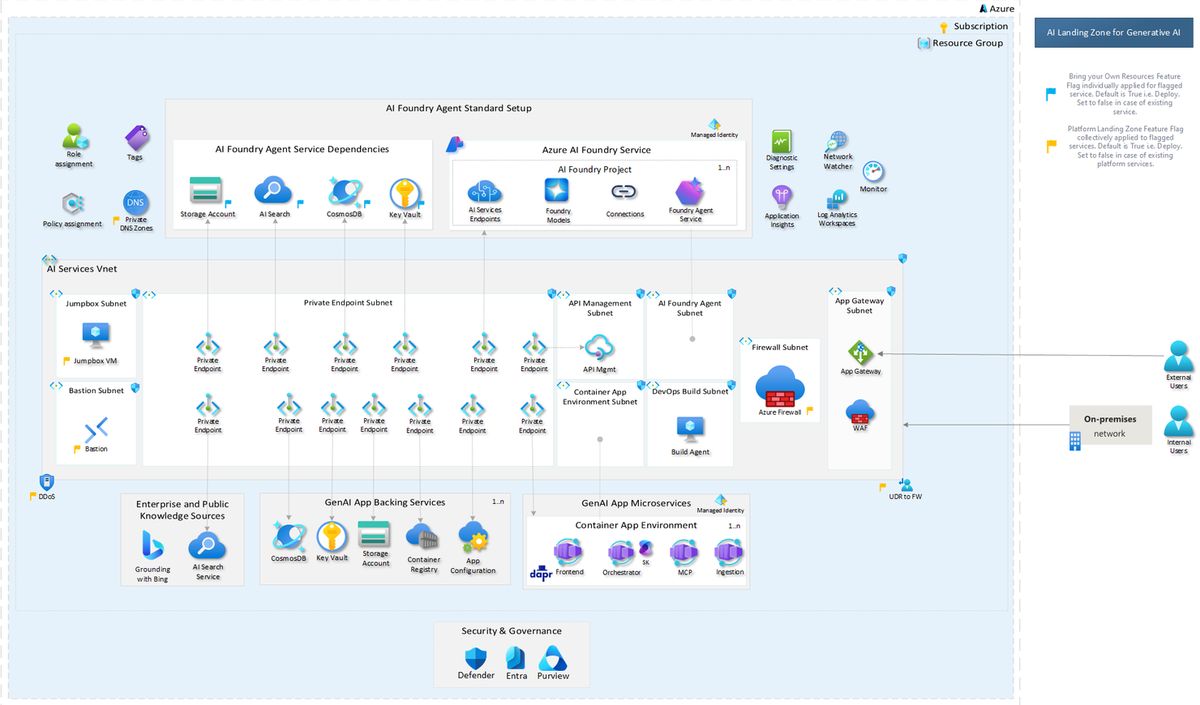
An AI Landing Zone is an application landing zone (the CAF's current landing zone guidance calls the same idea a workload landing zone): an open-source reference architecture for deploying AI apps and agents on Azure with governance and security built in. Key points, from the project's own documentation:
- It can be deployed with or without a platform landing zone.
- It ships as Portal, Bicep, and Terraform deployments built on Azure Verified Modules.
- It aligns with the Cloud Adoption Framework (CAF) AI scenario and Azure Well-Architected guidance.
- It is currently labeled preview. That is a reason to test carefully, not a reason to avoid it.
The repository describes two patterns, which can be deployed independently or together: an Agent Landing Zone built around Microsoft Foundry for the workload itself, and an AI Gateway Landing Zone that puts Azure API Management in front of models for org-wide access control. For a worked example of using it in practice, see standing up a governed agentic AI platform.
Where it fits in the Cloud Adoption Framework
Microsoft's AI adoption guidance in the CAF describes six phases: Strategy, Plan, Ready, Govern, Secure, Manage. The landing zone is the deliverable of Ready, which comes before teams ship pilots. Skipping Ready is how the second-team problem starts, which we covered in running agentic AI at enterprise scale.
The design checklist, area by area
The design checklist is a table of recommendations, each with a design consideration, a recommendation, and reference links. As of September 26, 2026 it contains 44 recommendations across 10 design areas:
| Area | Recommendations |
|---|---|
| Networking | 9 |
| Identity | 6 |
| Monitoring | 6 |
| Governance | 5 |
| Security | 5 |
| Cost | 4 |
| Resource organization | 4 |
| Data | 3 |
| Compute | 1 |
| Reliability | 1 |
The checklist still says "Azure AI Foundry" throughout, the product's earlier name, so search for that when you cross-reference. Here is what each area asks for.
Networking (9)
The largest area, and the least forgiving to change later. The checklist recommends private endpoints for all PaaS services and AI model endpoints so none are reachable from the public internet, network security groups on every virtual network, and restricting outbound traffic by default to approved destinations to limit data exfiltration. It also covers DDoS protection for public-facing workloads, a Web Application Firewall (Application Gateway or Front Door) for the public front end, Azure Firewall with user-defined routes, private DNS zones, Bastion-fronted jumpboxes for development access, and API Management as a generative AI gateway. Several of these say to use the central platform landing zone's service when one exists.
Identity (6)
The theme is removing static secrets. Use managed identities with least privilege, use Microsoft Entra ID for authentication, and disable key-based access to model endpoints so only Entra ID works. Add MFA and Privileged Identity Management for sensitive accounts, Conditional Access, and least-privilege RBAC.
Monitoring (6)
Monitor models, resources, and applications against workload KPIs. Send diagnostic logs and metrics for every deployed resource to a Log Analytics workspace, enable the recommended Azure Monitor baseline alerts, use Foundry's built-in evaluation for generative AI quality, and track model and data drift. Network Insights and Network Watcher cover networking problems.
Governance (5)
Use built-in Azure Policy for AI resources and apply it at the management-group level. Review standards such as the NIST AI Risk Management Framework, adopt responsible-AI standards, and set a baseline content filter with Azure AI Content Safety. One of the most practical items: govern which models teams can deploy with an Azure Policy allowlist. The checklist advises starting with the audit effect and moving to deny only after you understand what teams need, and notes that switching to deny does not remove models that are already deployed.
Security (5)
Review Microsoft Defender for Cloud recommendations, follow the Microsoft Cloud Security Baseline, use Purview to reduce insider-risk and oversharing exposure, and review MITRE ATLAS and the OWASP Generative AI risks. It also recommends monitoring outputs and applying prompt shielding with Content Safety.
Cost (4)
Understand the billing model before you build. The checklist suggests combining provisioned throughput (PTU) endpoints for predictable load with a consumption-based endpoint for spillover, considering the global deployment type for lower per-token pricing on certain OpenAI models, and enforcing auto-shutdown for non-production compute.
Resource organization (4)
Choose regions by service availability, check quota and subscription limits before workloads grow, and scale through multiple accounts and projects. The checklist suggests one Foundry resource per billing boundary so costs can be allocated by team.
Data (3)
Use the standard setup of Foundry Agent Service so threads, messages, and uploaded files are stored in your own Azure resources, giving you ownership and control. Separate thread storage, file storage, and vector search by project for isolation. If you use Microsoft Fabric, surface that data through the Fabric data agent.
Compute (1)
Standardize compute across models, orchestrators, self-hosted agents, and applications, favoring PaaS options such as Azure Container Apps, App Service, or Azure Kubernetes Service.
Reliability (1)
Deploy across at least two regions for high availability and disaster recovery, following the recovery guidance for each service and data store you use.
What the checklist does not decide for you
The checklist is deliberately a set of considerations, not a finished design. It will not pick your agent framework, your data platform, your regions, or your operating model. Those are engagement-specific decisions, and they are where most of the real work sits. Treat the checklist as the agenda for those conversations, not the answer to them.
A practical order of operations
- Decide the irreversible things first: identity model, network topology, region, and how projects map to billing.
- Deploy the landing zone as code, and put that infrastructure through the same pull-request and scanning discipline as application code. This is the agentic DevOps approach applied to the platform layer.
- Set governance in audit mode, watch what teams actually deploy, then tighten.
- Ship the first agent onto it, using patterns from the Microsoft Foundry accelerators where one fits.
- Add evaluation and monitoring before scaling to more teams.
To score the controls that sit on top of the landing zone, such as evaluation gates, identity, spend and approval, use our free Agent Platform Production Checklist. To work through the landing zone design checklist itself in the order the decisions become expensive to reverse, use our free Azure AI Landing Zone Readiness Checklist. If you want a second set of eyes on where your environment stands against the checklist, book a discovery call.
Key resources
- Azure AI Landing Zones repository
- Design checklist
- Azure Verified Modules
- Introduction to Microsoft Foundry workshop, our hands-on first step before a full landing zone
- Microsoft Agent Framework, compared with alternatives in Microsoft's agent frameworks compared
Related: to follow changes to the Azure Policy and RBAC layer a landing zone depends on, see AzAdvertizer: Track Azure Policy and RBAC Changes.
Kevin Evans
 Founder, Code To Cloud Inc.
Kevin Evans leads agentic DevOps and application modernization engagements for enterprise and mid-market teams, and offers fractional CTO advisory to growing businesses. He spent nearly five years at Microsoft, rising to Senior Solutions Engineer, and is a CNCF Ambassador and Calgary chapter lead, based in Calgary, Alberta. More about Kevin
Founder, Code To Cloud Inc.
Kevin Evans leads agentic DevOps and application modernization engagements for enterprise and mid-market teams, and offers fractional CTO advisory to growing businesses. He spent nearly five years at Microsoft, rising to Senior Solutions Engineer, and is a CNCF Ambassador and Calgary chapter lead, based in Calgary, Alberta. More about Kevin
Frequently Asked Questions
What is an Azure AI Landing Zone?
An application landing zone (the CAF now says workload landing zone): an open-source Microsoft reference architecture for deploying secure, resilient AI apps and agents on Azure. It can be deployed with or without a platform landing zone, ships as Portal, Bicep, and Terraform deployments built on Azure Verified Modules, and is currently in preview.
What is in the Azure AI Landing Zones design checklist?
As of 2026-09-26 the checklist has 44 recommendations across 10 design areas: compute, cost, data, governance, identity, monitoring, reliability, resource organization, security, and networking. Networking is the largest with 9 items, followed by identity and monitoring with 6 each.
Do I need a platform landing zone first?
No. The AI Landing Zone can be deployed with or without one. Several checklist items, such as Azure Firewall, private DNS zones, Bastion, and DDoS protection, say to use the central platform landing zone service when one exists, so having one reduces what the AI landing zone must provide itself.
Is the AI Landing Zones project ready for production?
It is labeled preview, so treat it as a strong, Microsoft-published starting point rather than a settled product. Test it thoroughly, pin what you deploy, and re-check the repository before each rollout.
Where should a team start with the checklist?
With the decisions that are painful to change later: identity (managed identities and Microsoft Entra ID instead of API keys), networking (private endpoints and restricted outbound traffic), data ownership for agent state, and resource organization (regions, quota, and how projects map to billing). Cost, monitoring, and content safety can follow, but should be planned before the first workload ships.