
What's Inside
- What the workshop covers, module by module
- The one idea most agent tutorials skip: proving the agent is fit to ship
- What was verified, and when
- What not to rely on, and where to get the code
Most agent tutorials end when the agent answers a question. The question that decides whether an agent ships is a different one: how do we know it is good enough to release?
This is the workshop we run with teams, published as open source under an MIT license: github.com/codetocloudorg/intro-to-microsoft-foundry. It takes about 60 minutes, in Python, and ends with an agent that has been scored and gated, not just one that responds.
What you deploy
One template creates everything inside a single Azure resource group. Your terminal talks to it with your own Microsoft Entra ID sign-in, so there are no API keys.
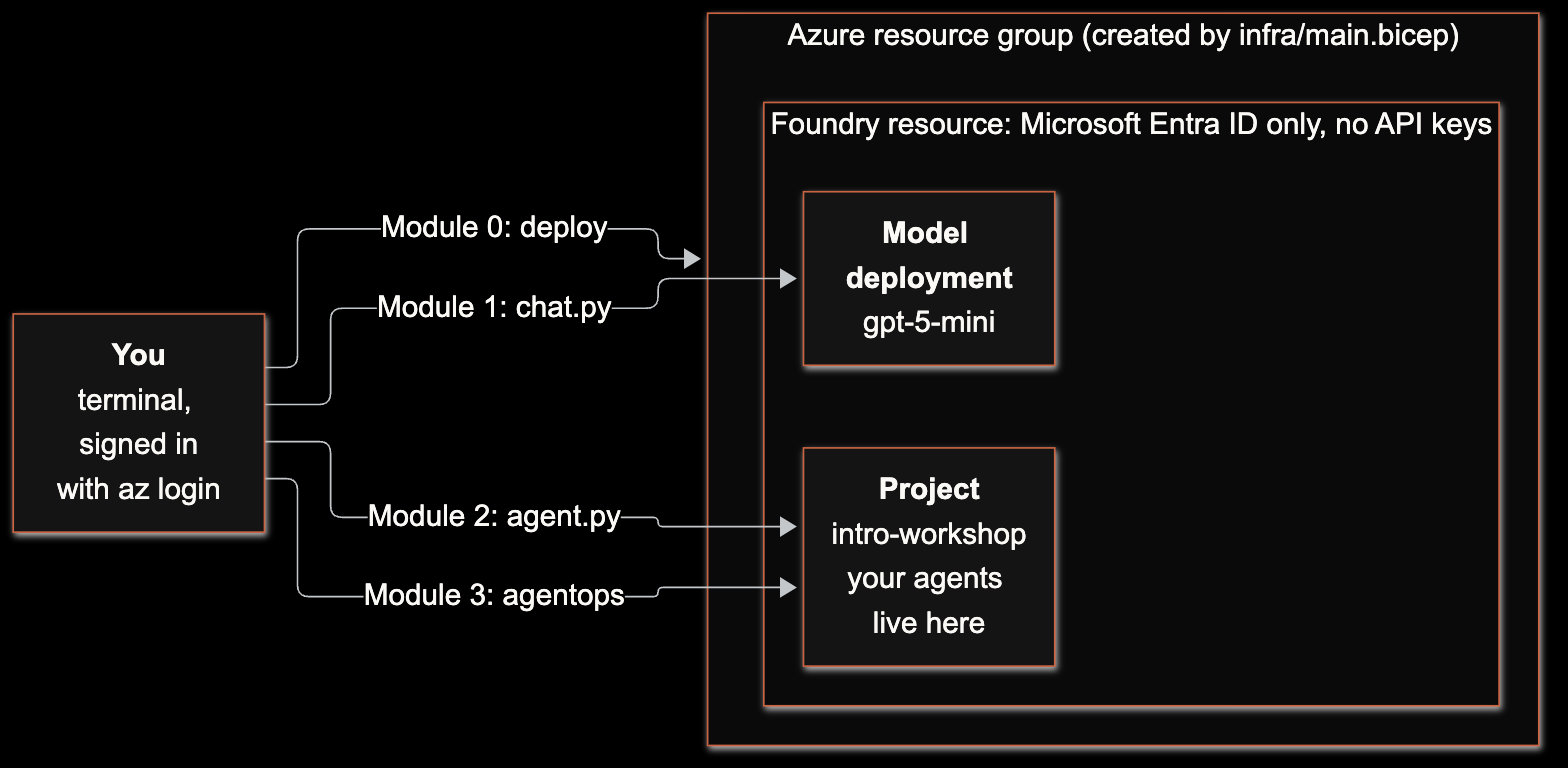
The four modules
Module 0, deploy and connect. A Bicep template creates a Foundry resource, a project and a gpt-5-mini deployment. Key-based access is disabled, so only Microsoft Entra ID works and there are no API keys to leak. The template also grants you the Foundry User role, because Owner alone cannot call a project's data plane.
Module 1, chat with a model. One prompt, one response through the Responses API. It confirms your sign-in, endpoint and deployment work before anything is built on top.
Module 2, build an agent. A named, versioned agent with standing instructions. Calling the create step again produces version 2 instead of overwriting version 1. A conversation object gives it multi-turn memory, so a follow-up like "and what is the capital?" makes sense without repeating the subject.
Module 3, evaluate and govern. Using Microsoft's open-source AgentOps Accelerator, you score the agent, add thresholds, and generate a release-readiness report with an evidence pack. A missed threshold exits with code 2, which is what lets a CI job block a release.
What was verified
We ran every module against a live Azure subscription on September 26, 2026, with azure-ai-projects 2.7.0 and AgentOps Accelerator 0.15.1, including a clean redeploy from scratch in a fresh resource group. Along the way we hit and fixed a deployment race in the template, and corrected a wrong AgentOps command sequence in our own first draft. The repository documents both.
What to rely on, and what not to
This is a learning path, not a production template. Foundry's SDK moves quickly, so check Microsoft's current quickstart if a call fails after a new release. AgentOps Accelerator is pre-1.0, so the workshop pins the exact version it was tested with.
Moving past a workshop means the platform underneath matters more than the agent code: identity, networking and policy. We wrote up Microsoft's design checklist for that in Azure AI Landing Zones, and what it looks like in practice in standing up a governed agentic AI platform. If you are choosing where to start, Microsoft Foundry solution accelerators by industry maps the official starting points.
Where to go next
- Not sure where your organization stands? Take the free Agentic AI Readiness Scorecard. It takes a few minutes, needs no email, and maps your result to Microsoft's own Agentic AI Adoption Maturity Model.
- Want the workshop with your own data and use case? We run it as a working session with your team. Book a discovery call and we will talk through where you are today. No pitch.
Kevin Evans
 Fractional CTO & Founder, Code To Cloud Inc.
Kevin Evans is a fractional CTO and technology advisor based in Calgary, Alberta. He spent nearly five years at Microsoft, rising to Senior Solutions Engineer, and now leads enterprise and mid-market engagements at Code To Cloud. More about Kevin
Fractional CTO & Founder, Code To Cloud Inc.
Kevin Evans is a fractional CTO and technology advisor based in Calgary, Alberta. He spent nearly five years at Microsoft, rising to Senior Solutions Engineer, and now leads enterprise and mid-market engagements at Code To Cloud. More about Kevin
Frequently Asked Questions
What do I need to run the workshop?
Python 3.10 or later, the Azure CLI with Bicep, and an Azure subscription where you can create resources and assign roles. The workshop deploys its own Foundry resource, project and model. Windows users should run it inside WSL2, since the commands are bash and native PowerShell was not tested.
How long does it take and what does it cost?
About 60 minutes across four modules, including a few minutes of Azure deployment time. The model usage is a few cents, and the workshop shows how to delete the resource group when you finish.
Is the code production-ready?
No. It is a learning path. The Bicep template creates a public-endpoint, Entra-only environment for learning, and Module 3 uses AgentOps Accelerator, which is pre-1.0. Production needs private networking, policy and identity controls, which is what Azure AI Landing Zones covers.
What does Module 3 add that most tutorials skip?
Evaluation. Most tutorials stop when the agent responds. Module 3 baselines the agent, sets a pass/fail threshold that exits with a real error code so a CI job can block a release, and produces a release-readiness report with an evidence pack.