
Every Azure governance team has the same Monday problem. Over the weekend, Microsoft added some policies, changed the effect on others, and touched a few role definitions. Nobody sent an email. Your landing zone either picks it up or it doesn't.
AzAdvertizer is a free website that logs those changes every day and lets you search the lot. It is the one governance bookmark I would put in front of a platform team. This post covers what it does, shows three screens that earn their keep, and is honest about where it stops.
What's Inside
- What AzAdvertizer tracks, and who built it
- The change log: seven thousand policy changes, filterable
- The least-privilege finder, with a real example
- The relations map, and what it is good for
- Where it stops, and the free next step if you want to know where you stand
A shoutout first
AzAdvertizer is one person's project. Julian Hayward builds and runs it, and the site says plainly that it is a personal project, not a Microsoft service. The GitHub repository was created on 17 October 2019, so on 17 October 2026 it turns seven years old. Keeping a site current every day for that long, for free, is real work, and plenty of us use it without saying thanks. Thank you, Julian.
If it saves your team time, open an issue on the repo with what you'd like added, or tell someone else about it. The repo holds the README and issue templates, and that is where feedback goes.
What it does
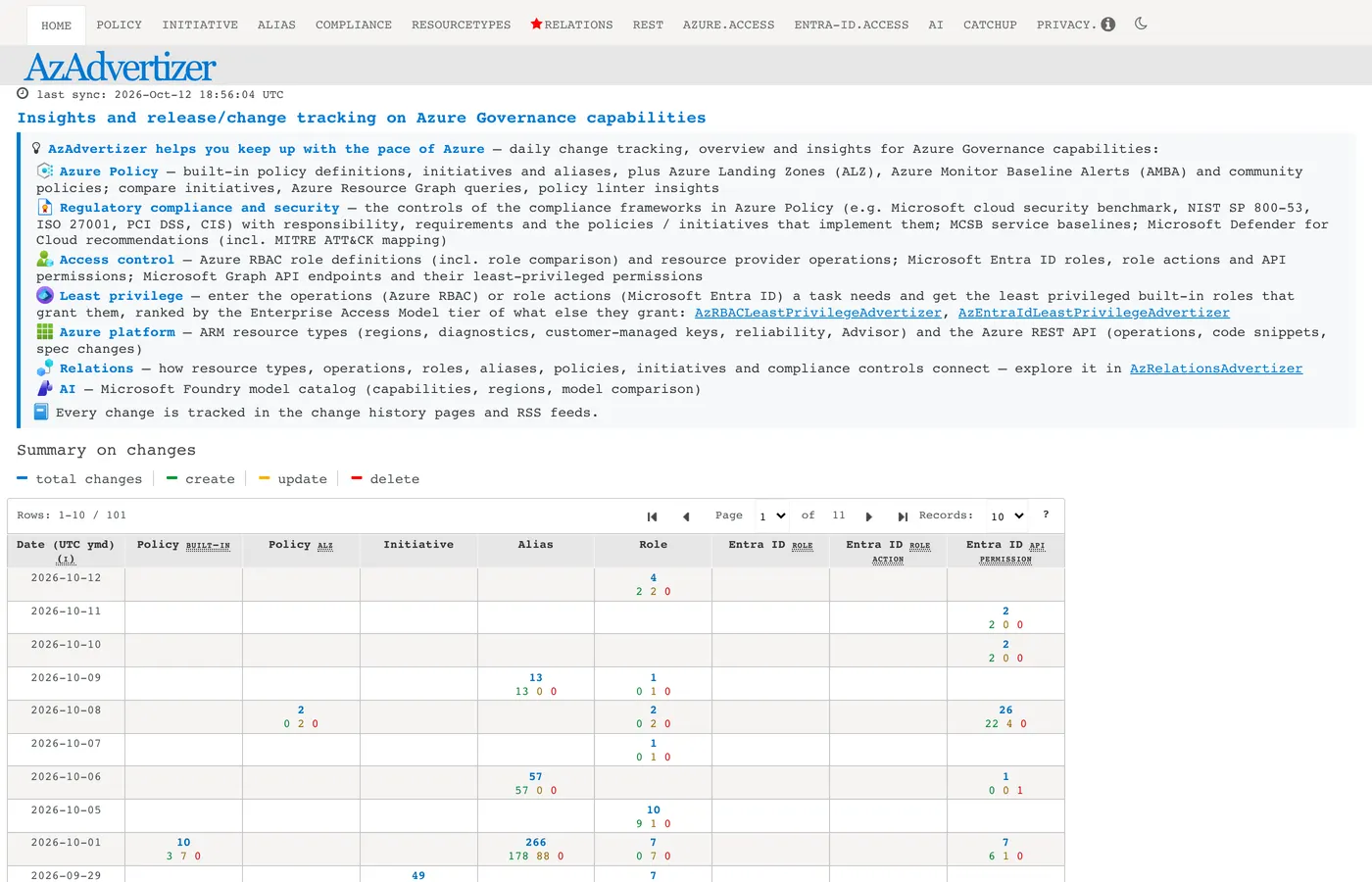
The home page describes it as "insights and release/change tracking on Azure Governance capabilities." In practice, the top navigation tells you the scope. These are the areas it covers, as listed on its own home page:
- Azure Policy. Built-in policy definitions, initiatives and aliases, plus Azure Landing Zones (ALZ), Azure Monitor Baseline Alerts (AMBA) and community policies. It also has an initiative comparison, Azure Resource Graph queries and policy linter insights.
- Regulatory compliance and security. The controls of compliance frameworks in Azure Policy (Microsoft cloud security benchmark, NIST SP 800-53, ISO 27001, PCI DSS, CIS) with the policies and initiatives that implement them, plus Microsoft Defender for Cloud recommendations with MITRE ATT&CK mapping.
- Access control. Azure RBAC role definitions, a role comparison, resource provider operations, Microsoft Entra ID roles, role actions and API permissions, and Microsoft Graph endpoints.
- Least privilege. Two finders, one for Azure RBAC and one for Entra ID, covered below.
- Azure platform. ARM resource types and the Azure REST API.
- Relations. A graph of how all of the above connect.
- AI. A Microsoft Foundry model catalog with capabilities, regions and a model comparison.
Every change shows up on a change history page and in an RSS feed. That is what makes it useful to a team and not just a lookup tool.
Screen one: the change log
Open the Policy tab and you land on the change history. When we looked on 12 October 2026 it listed 7,030 changes across 71 pages, with filters on category, type (BuiltIn or ALZ), change type and date.
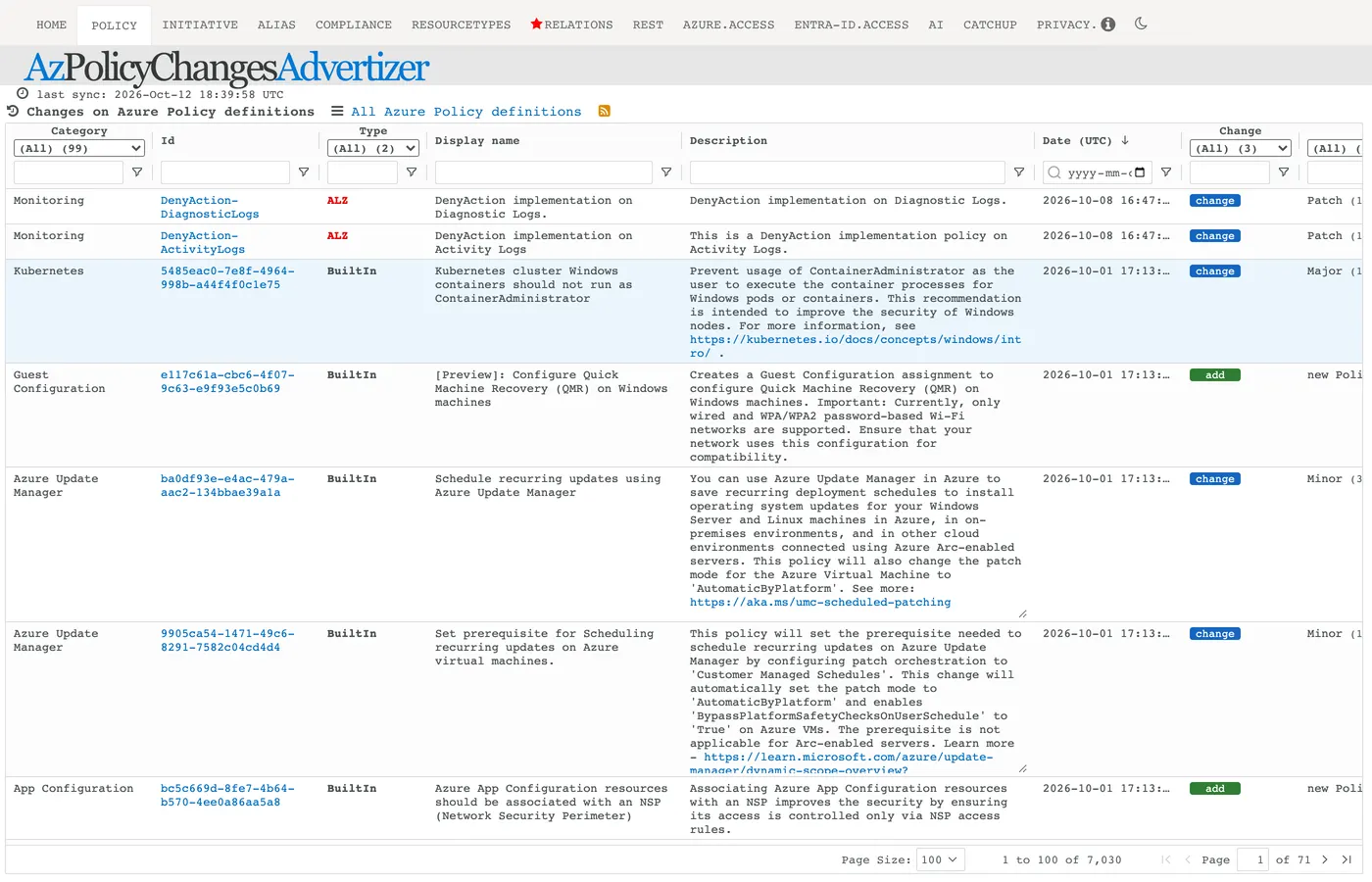
Two things make this more useful than reading Microsoft's release notes. First, the rows are the actual definitions: full description, policy ID and a change label (add or change), with a version column that says whether the change was major, minor or patch. Second, you can filter to the category you care about, such as Kubernetes or Monitoring, instead of reading everything.
The reason this matters is that policy definitions are not static. A built-in definition can change its parameters or behavior, and an initiative you assigned last year may now contain different policies. If you assign policy at scale, a change log is how you find out before a compliance report does.
Screen two: the least-privilege finder
This is the one I would show a skeptical engineer first. You type the operations a task needs, and it tells you which built-in roles grant all of them, ranked by how much extra access each role carries.
We tried the site's own "start / stop VMs" example, which enters three operations: start a virtual machine, deallocate it, and read it. It found nine built-in roles that grant all three.
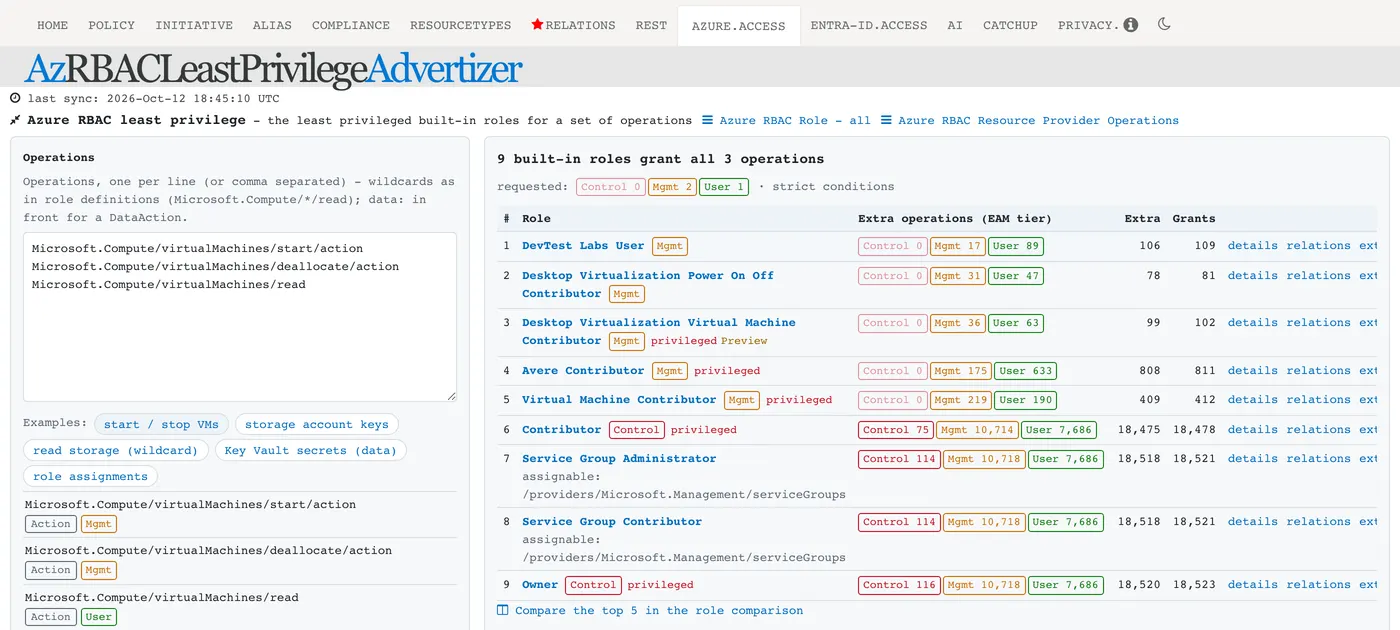
Read the "Extra" column. At the top of the list, DevTest Labs User grants 106 operations beyond the three requested. Further down, Contributor grants 18,475 extra, and Owner 18,520. The tool also tags each extra operation with its tier from Microsoft's Enterprise Access Model (Control, Management or User plane). The roles near the top carry zero Control-plane extras. Contributor carries 75.
That is the argument for least privilege, shown as a number. Handing someone Contributor so they can start and stop VMs works, and it also gives them more than eighteen thousand other operations. Whether the top-ranked role is right for you is still a judgment call. A role built for one service may not fit your scope, and a custom role may be the better answer. The tool narrows the field. It doesn't make the decision.
There is an equivalent finder for Entra ID roles and role actions.
Screen three: the relations map
AzRelationsAdvertizer draws Azure as a graph, with groups of roles, policies, initiatives, controls and recommendations around it. Click a group and it opens the connections.
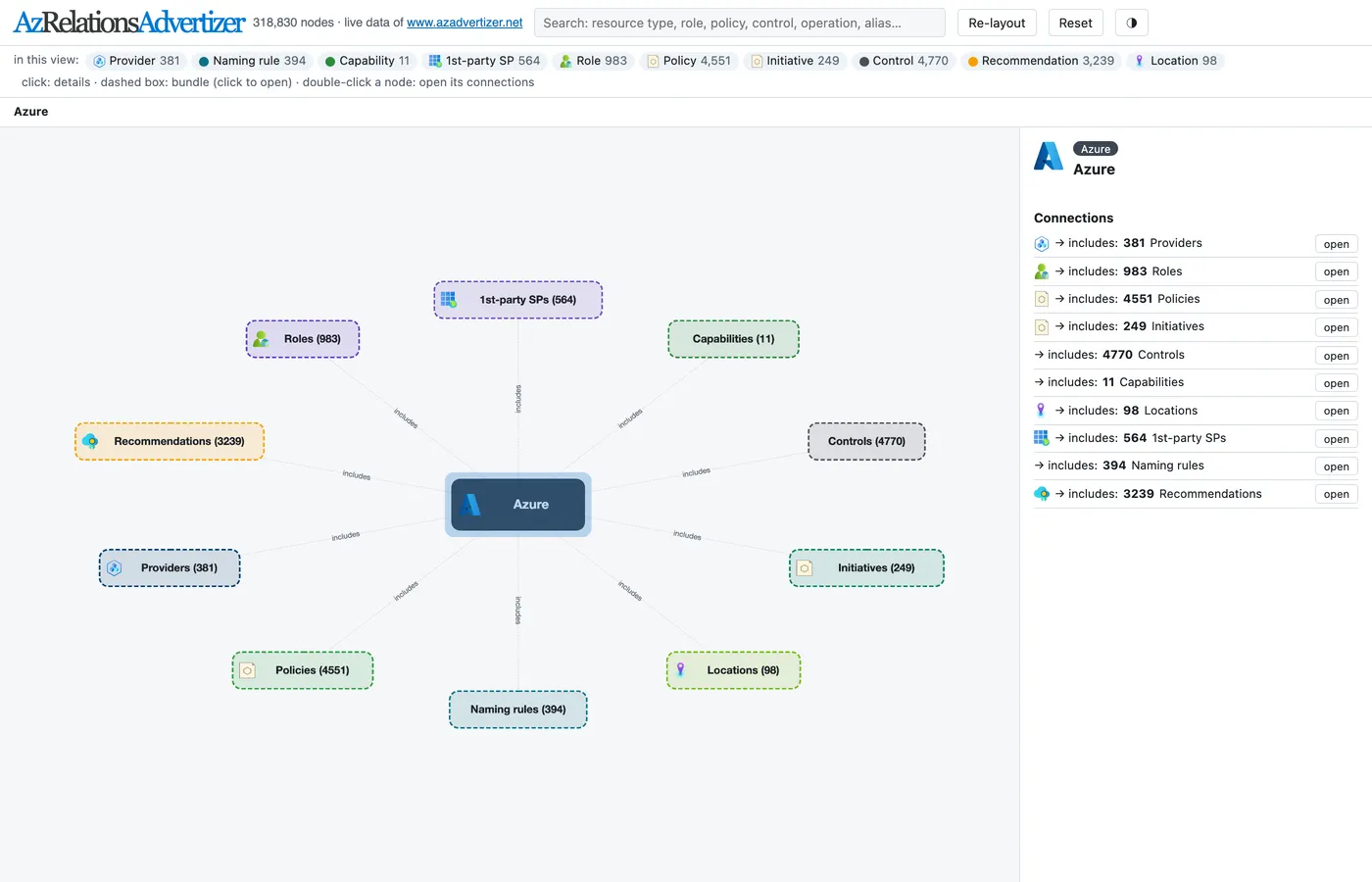
The side panel gives a sense of scale for anyone planning governance. As of 12 October 2026: 4,551 policies, 249 initiatives, 983 roles, 4,770 controls and 381 resource providers. The point of the map is following one thread. Pick a resource type and see which operations touch it, which roles can perform them, and which policies and compliance controls apply. That is the question an auditor asks, and answering it by hand across four documentation sites is slow.
Where it stops
- It is a personal project. The site says so and provides no warranty. Use it to find what changed and confirm anything that matters in Microsoft's documentation.
- It reports change, not your estate. AzAdvertizer knows what Microsoft shipped. It doesn't know what you have assigned, what is non-compliant, or which of those 7,030 changes touch your tenant. Closing that gap takes your own data (Azure Policy compliance, Resource Graph, Defender for Cloud).
- Counts move daily. Every number in this post is dated. Check the site before you quote one.
- Check the sync time. Every page shows a "last sync" timestamp. If it is stale, so is the data.
Where this fits for an AI platform
If you are putting agents into production on Azure, governance drift is a larger risk than it looks. Model allowlists and private endpoint enforcement sit on Azure Policy, and the roles your agents run under sit on RBAC. A weekly look at the change log for the categories you depend on is cheap insurance. The least-privilege finder is a faster way to start a role review than reading role definitions.
We cover the policy layer for AI workloads in the Azure AI Landing Zone readiness checklist. It includes checks on built-in policy at the management-group level and a policy allowlist for models. The identity side is in Running Agentic AI at Enterprise Scale.
Frequently Asked Questions
What is AzAdvertizer?
AzAdvertizer is a free website that records daily changes to Azure governance: Azure Policy definitions, initiatives and aliases, Azure RBAC roles and resource provider operations, Microsoft Entra ID roles and API permissions, and more. It is a personal project by Julian Hayward, not a Microsoft service.
Is AzAdvertizer an official Microsoft product?
No. The site states it is developed by a Microsoft employee as a personal project, not a Microsoft service or product, and is provided as is without warranties. Treat it as a fast way to find what changed, and confirm anything important against Microsoft's own documentation.
How do I find the least privileged Azure role for a task?
Open AzRBACLeastPrivilegeAdvertizer, enter the operations the task needs, and it lists the built-in roles that grant all of them, ranked by how much extra access each one carries. For three virtual machine operations it found nine built-in roles on 12 October 2026, from DevTest Labs User up to Owner.
Sources
- AzAdvertizer: home page, change history, least-privilege and relations pages, all viewed 12 October 2026 (last sync shown as 2026-Oct-12)
- AzAdvertizer on GitHub: README and issue templates; repository created 2019-10-17, not archived, no licence file
Screenshots are our own captures of a third-party site, taken 12 October 2026 and shown with attribution. All figures are as displayed on that date and will have changed.
Where to go next
- Know the tool, not sure where you stand? Take the free Agentic AI Readiness Scorecard. It takes a few minutes and needs no email.
- Want the AI landing zone checks in a list? Use the free Azure AI Landing Zone Readiness Checklist.
- Want a second pair of eyes on your agent platform? Bring your score to a Discovery Call and we will scope the Agent Platform Readiness Review with you.
Kevin Evans
 Founder, Code To Cloud Inc.
Kevin Evans leads agentic DevOps and application modernization engagements for enterprise and mid-market teams, and offers fractional CTO advisory to growing businesses. He spent nearly five years at Microsoft, rising to Senior Solutions Engineer, and is a CNCF Ambassador and Calgary chapter lead, based in Calgary, Alberta. More about Kevin
Founder, Code To Cloud Inc.
Kevin Evans leads agentic DevOps and application modernization engagements for enterprise and mid-market teams, and offers fractional CTO advisory to growing businesses. He spent nearly five years at Microsoft, rising to Senior Solutions Engineer, and is a CNCF Ambassador and Calgary chapter lead, based in Calgary, Alberta. More about Kevin