"Sovereign cloud" has become one of the most talked-about phrases in Canadian technology. The federal government has named a sovereign cloud as one of its new strategies, and more Canadian teams are asking the same question: should we be building our own platform here in Canada?
The honest answer is "it depends on the data", and the term often gets used loosely. This post sets out what the Government of Canada's own guidance says, the questions I'd ask before choosing anything, and the realistic platform options, from Azure's Canadian regions to OpenShift running in your own datacentre.
This is a technology view, not legal advice. If your obligations come from a regulator or a contract, check them with the people responsible for them.
What's Inside
- Why storing data in Canada isn't the same as sovereignty
- What the Government of Canada's guidance actually says
- Four questions to ask about any platform
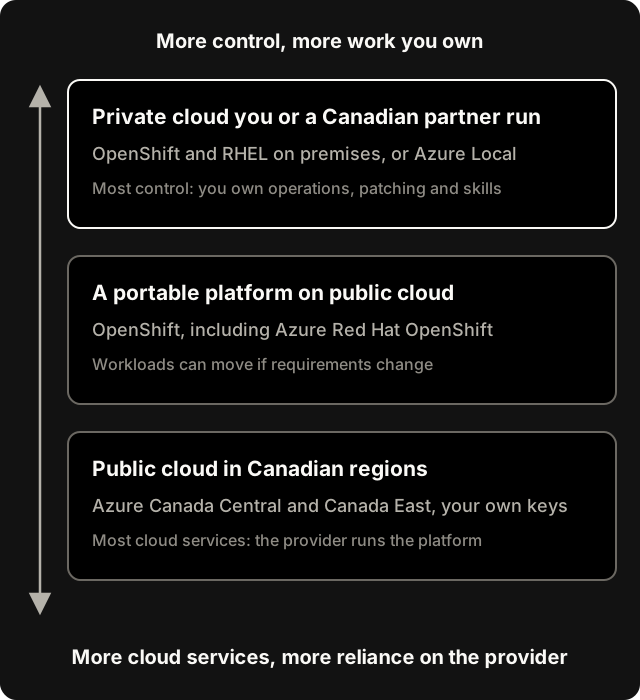
- The options, from public cloud to a private platform
- How to decide what each workload needs
Residency Is Not Sovereignty
The most common mix-up is treating "our data is in a Canadian region" as the whole answer. The Government of Canada's own guidance says it isn't.
- Its white paper on data sovereignty and public cloud, from the Treasury Board of Canada Secretariat, states that "data residency does not mitigate against the application of foreign laws." A cloud provider with operations abroad can be compelled by a foreign authority to hand over data, wherever that data sits.
- The newer Digital Sovereignty Framework (November 2025) goes further: "using a Canadian supplier or storing data in Canada does not guarantee data will be outside the jurisdiction of foreign courts." It names the U.S. CLOUD Act and FISA as examples of laws that allow this, and lists Canadian statutes that work the same way.
The framework is also balanced about the risk. It notes that the government "could find no documented cases of foreign governments seeking access to the data of Canadian enterprises held by suppliers." So this is about managing a real but uncommon risk in proportion to what's at stake. It isn't a reason to panic.
What the Guidance Says, in Short
| Source | Key points |
|---|---|
| White paper (TBS) | Commercial public cloud can, under certain conditions, protect government data up to Protected B. Encrypt data in transit and at rest, and keep "exclusive control of the encryption keys." Use contract clauses that require the provider to disclose access. |
| Digital Sovereignty Framework (2025) | Defines digital sovereignty as "the ability of the GC to exercise autonomy over its digital infrastructure, data and intellectual property." It looks past storage to security, privacy, workforce skills, market concentration, and how critical each system is. It says sovereignty is distinct from buy-Canadian procurement policy. |
| Prime Minister's remarks, November 2025 | A sovereign cloud is named as one of the new national strategies, alongside critical minerals and high-speed rail. |
These documents are written for the federal government, but the thinking carries over well to provinces, health, energy, finance and any business holding sensitive data.
Four Questions to Ask About Any Platform
This is the checklist I use. It's my framing, not a government standard, but each question maps to something in the guidance above.
- Where is the data stored and processed? This is residency: the part most people already ask about.
- Whose laws can reach it? This is jurisdiction. It depends on where the provider and its parent company operate, not just where the servers are.
- Who operates the platform, and who holds the keys? This is operational control. If the provider runs the platform and manages your encryption keys, you're trusting them with both.
- Can you leave? This is portability. If your requirements change, can you move workloads to another provider or your own datacentre without rebuilding them?
The Options
Public cloud in Canadian regions
Microsoft lists two Azure regions in Canada: Canada Central in Toronto, with three availability zones, and Canada East in Quebec, its paired region, which has no availability zones.
This option gives you residency and the full range of cloud services. For the jurisdiction question, the government's advice is to hold your own encryption keys and use contract terms that require disclosure. Microsoft also offers Microsoft Sovereign Cloud, which adds customer-managed keys and policy templates through a Sovereign Landing Zone. Microsoft's own documentation says its foundation targets European datacentre regions, while the technical controls are available worldwide. So don't assume the full package applies in Canada. Check with Microsoft for your case.
Best for: most workloads, including much sensitive data, once keys and access are under your control.
A portable platform on public cloud
Running workloads on OpenShift keeps them portable. The same platform runs on premises, in a partner's datacentre, or on public cloud. Azure Red Hat OpenShift is OpenShift as a managed service that Microsoft describes as jointly engineered, operated and supported by Red Hat and Microsoft. The trade-off is that they operate the platform. In return, you can change where workloads run later without rebuilding them.
Red Hat positions OpenShift and RHEL as a foundation for sovereign environments. One detail worth knowing: Red Hat's Confirmed Sovereign Support, which keeps support in-region, is available in the USA and the European Union today, with more regions planned. At the time of writing, Canada isn't one of them.
Best for: organizations that want cloud speed now and the option to move later.
A private cloud you or a Canadian partner run
This gives you the most control: OpenShift and RHEL on your own hardware, in your datacentre or a Canadian partner's. Microsoft's equivalent is Azure Local, the basis of its Sovereign Private Cloud, which runs in customer-controlled or partner-operated datacentres and can run disconnected from the internet.
The catch is that you own the operations: patching, upgrades, capacity, security monitoring and the skills to do all of it. The government's framework lists workforce and skills as a sovereignty challenge in its own right, because depending on outside expertise is a dependency too. Automation matters even more here. That's why I'm building and documenting a RHEL 10 lab for Ansible and OpenShift.
Best for: the most sensitive systems, critical infrastructure, and workloads that must keep running if links to outside providers are cut.
How to Decide
The framework's advice is to manage risk in proportion to how critical each system is. In practice, that means:
- Classify your data and systems first. Most organizations find that only a small share needs the strictest controls.
- Ask the four questions for each class. Write down what "sovereign enough" means for each.
- Use the lightest option that meets the requirement. Canadian regions with your own keys cover a lot. Keep the private platform for what truly needs it.
- Build for portability where requirements are likely to change. That's where OpenShift earns its place.
- Plan for the people. A private platform without the skills to run it is a risk of its own.
If Azure is part of your answer, our free Azure AI Landing Zone Readiness Checklist includes a region check you can run against your plans.
Where We Can Help
We help Canadian organizations work through these decisions and build the result: classifying workloads, designing Azure landing zones, and planning and building OpenShift and RHEL platforms, on premises or on Azure. It's engineering work, not a legal or compliance opinion. See how we work with Azure and Red Hat, or book a discovery call to talk through your situation.
Kevin Evans
 Founder, Code To Cloud Inc.
Kevin Evans leads agentic DevOps and application modernization engagements for enterprise and mid-market teams, and offers fractional CTO advisory to growing businesses. He spent nearly five years at Microsoft, rising to Senior Solutions Engineer, and is a Microsoft MVP for Azure, a CNCF Ambassador and Calgary chapter lead, based in Calgary, Alberta. More about Kevin
Frequently Asked Questions
What is the difference between data residency and data sovereignty?
Data residency is where your data is physically stored. Sovereignty is about who has legal and practical control over it, including which country's laws can compel access. The Government of Canada's own white paper on data sovereignty says that data residency does not mitigate against the application of foreign laws.
Does storing data in a Canadian cloud region make it sovereign?
Not on its own. The Government of Canada's Digital Sovereignty Framework says that using a Canadian supplier or storing data in Canada does not guarantee the data will be outside the jurisdiction of foreign courts. Residency helps, but you also need to look at who operates the platform, who holds the encryption keys, and whether you can move.
Which Azure regions are in Canada?
Microsoft lists two Azure regions in Canada: Canada Central in Toronto, with three availability zones, and Canada East in Quebec, which is its paired region and has no availability zones.
How does OpenShift help with sovereignty?
OpenShift runs the same way on premises, in a partner's datacentre or on public cloud, including as Azure Red Hat OpenShift. That portability means you can change where a workload runs if your sovereignty requirements change, without rebuilding the application.