4.0.0
Quattro
<6 GB
ISO Size
9
Agent CLIs Wired In
MIT
Licensed
Omarchy 4 shipped today. The version number undersells it — this is a from-scratch rewrite of the entire desktop shell, and the thing worth paying attention to isn't the shell at all.
It's that Omarchy now treats coding agents as system citizens rather than programs you happen to run — and I haven't seen another desktop Linux project at this level of adoption do it. There's a widget in the bar tracking how much of your Claude Code weekly limit you've burned. When a process segfaults, the OS offers to hand the core dump to your agent. It ships an agent skill, symlinked into ~/.claude/skills, that teaches your agent how to reconfigure the machine it's running on. And it now ships a second terminal multiplexer whose entire reason to exist is watching agents work.
That's a different idea about what a desktop is for. Here's what actually changed, what's genuinely good, and where I'd be careful.
What's Inside
- The Quickshell rewrite, and the eight components it deleted
- Nine coding-agent CLIs wired in as lazy-loaded launchers
- The agents bar panel: plan limits, token burn, cross-machine usage
- Crash diagnosis handed straight to your agent
- The shipped Omarchy skill — and why the manual calls it experimental
- tmux dev layouts, and Herdr: a multiplexer that knows when an agent is blocked
- How we run OpenCode and Claude Code on it at Code To Cloud
- Plugins: cloning a built-in widget instead of forking the project
- Pacman packaging, and what the package repo does and doesn't guarantee
- Whether to upgrade, install fresh, or wait
- Tips: Secure Boot, the missing Caps Lock, and the snapshot that skips
/home
What is Omarchy?
For anyone arriving cold: Omarchy is an omakase Linux setup built by David Heinemeier Hansson and shipped by 37signals under an MIT licence. It takes a fresh Arch Linux install and turns it into a fully configured, keyboard-driven development desktop on the Hyprland tiling compositor. Themes, hotkeys, terminal, editor and defaults all come decided for you.
The tagline is "Beautiful, Modern & Opinionated Linux by DHH", and the opinionated part is the product. You aren't assembling a desktop from parts, you're accepting somebody else's finished one. That trade is either obviously right or obviously wrong for you, and you usually know which within about ten seconds. The repo is past 24,000 stars, so a fair number of people have decided it's right.
About that codename
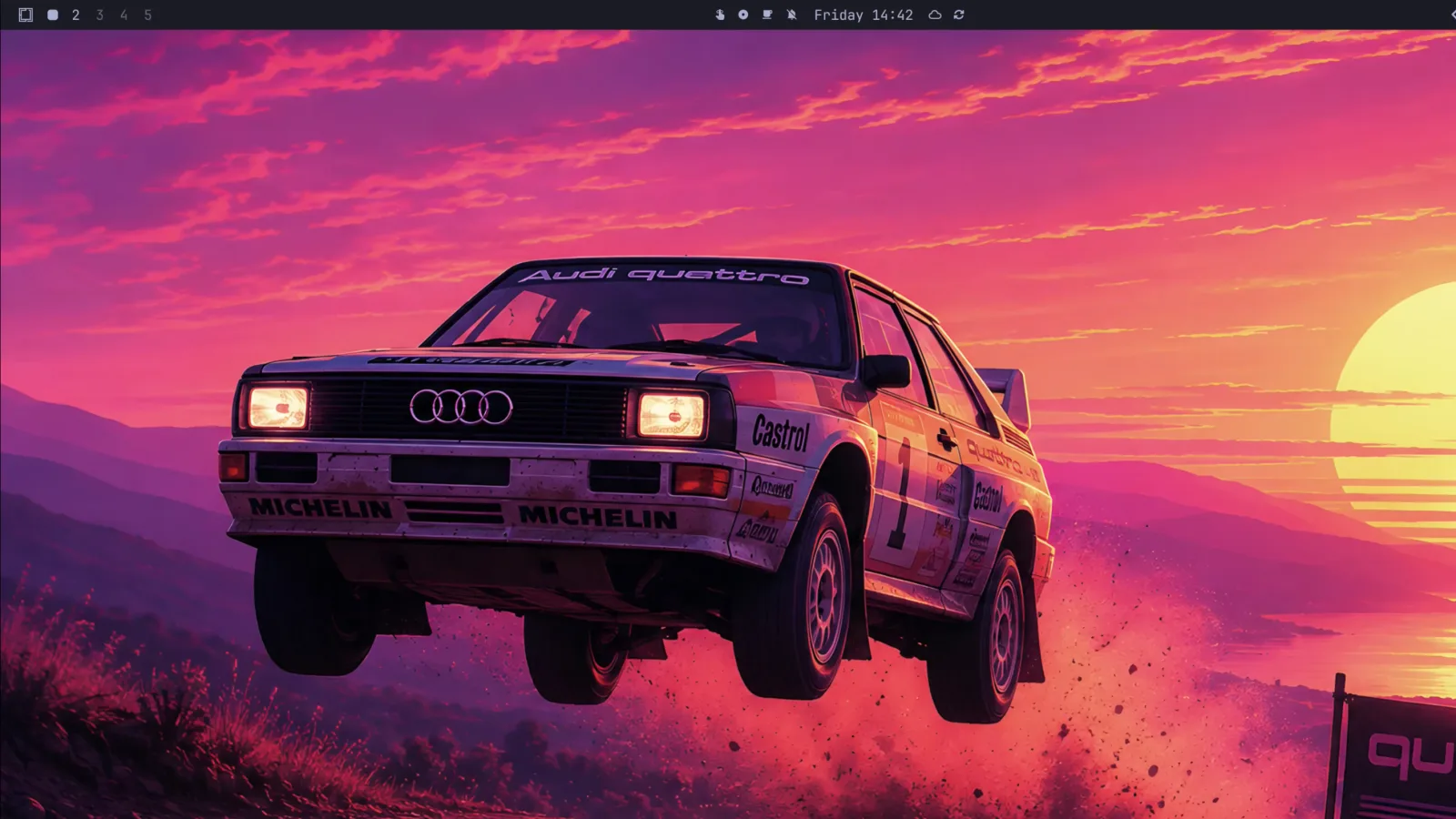
Quattro ships with a wallpaper of an Audi quattro mid-flight over a rally stage, which tells you the reference is to the Group B icon — DHH races cars for real, so that's the likely reading.
For a certain kind of British viewer, though, the word has been spoken for since 2008. Philip Glenister's DCI Gene Hunt spent three series of the BBC's Ashes to Ashes barrelling around the early eighties in a red Audi Quattro, and "Fire up the Quattro" became the line he's remembered for. It's the sort of catchphrase that outgrows its show: the screen-used coupé — still carrying the bullet holes from the 2010 finale — later went to auction in aid of Children in Need and fetched around £15,000.
Whether any of that crossed DHH's mind, I've no idea. But if you grew up with BBC One on a Saturday evening, you don't get to read this release note neutrally.
"It's just dotfiles in a trench coat"
Worth dealing with up front, because it's the standard objection and it has been fair comment for most of the project's life. Through 3.x, Omarchy really was a git checkout in ~/.local/share/omarchy full of opinionated config, and if that's your definition of a distro, it didn't clear it.
Quattro is the release where that stops being true. The system now installs as Arch packages with files in /etc and /usr/share/omarchy, updates flow through pacman, and the desktop is a real codebase: 104 QML files totalling about 1.2 MB at the v4.0.0 tag, roughly a third of the repository by volume, none of which existed a year ago. You can still dislike it. "It's only dotfiles" is now just factually behind.
The flip side deserves the same honesty: the desktop is built on quickshell-git, a package that tracks upstream git rather than a tagged release. Basing your entire shell on a moving dependency is a real bet, and it's the sort of thing that's fine right up until it isn't.
The shell rewrite
The headline, from the release notes:
Reimagine the entire desktop shell in Quickshell: the bar, launcher, menus, notifications, on-screen displays, control panels, lock screen, and polkit agent now all live inside a single long-running shell process with a plugin architecture.

The concrete version is better than the abstract one. These are gone from the tree entirely in 4.0:
Waybar. Walker. Mako. SwayOSD. hyprlock. hypridle. swaybg. polkit-gnome.
Eight separate programs, each with its own config format, its own theming story, and no knowledge of the other seven. In 3.x, changing an accent colour meant touching several of them and hoping they agreed. All eight are now plugins inside one QML process built on Quickshell. DHH reports the whole thing sits under 300 MB of runtime memory once shared libraries are accounted for.
The practical difference shows up in the small stuff. Status updates are event-driven rather than polled. Notification popups survive a shell restart. You can drag the bar to any screen edge and double-click empty space to toggle transparency. Theme colours went from 8 to 24, which is why the autogenerated Neovim, VS Code and btop themes stopped looking approximate.
| Change | Why it matters |
|---|---|
| Desktop shell rewritten in Quickshell (QML) as one long-running process | The desktop becomes programmable rather than configurable |
| Internals moved from a git checkout to pacman packages | Updates are ordinary package updates; system files live in /etc and /usr/share/omarchy |
| ISO under 6 GB, down more than a gigabyte; installs 30%+ faster | Sub-minute installs are possible on fast hardware |
| Hyprland config converted to Lua | Configuration gets loops, conditionals and shared values |
| Free-space install alongside Windows | Dual boot is supported properly, still with LUKS encryption |
| Theme palette 8 → 24 colours | Generated editor and terminal themes actually match |
foot is now the default terminal | Lower resource use; Alacritty, Ghostty and Kitty are still supported options |
| New first-party apps: Omawrite, Omacut, Omacalc | Markdown writing, video trimming and a calculator, all theme-aware |
Fifty-four people made their first contribution to this release. For a project this opinionated, that's a healthy sign.
The agent layer
This is the part I'd have led with if I were writing the release notes.
Omarchy 4 pre-wires nine coding-agent CLIs as lazy-loaded launchers — tiny mise-managed stubs in ~/.local/bin/, so nothing downloads until you first run one:
| Command | Agent |
|---|---|
claude | Claude Code |
codex | OpenAI Codex |
opencode | OpenCode |
gemini | Google Gemini CLI |
copilot | GitHub Copilot CLI |
crush | Crush |
grok | Grok CLI |
pi | Pi |
omp | Oh My Pi |
Notably, it doesn't pick a favourite for you. You set one with omarchy default agent <name> or under Setup > Defaults > Agent, and Super + Shift + Ctrl + A launches it in a dedicated window. There's a terminal alias a for running it inline, plus c, cx and cy for OpenCode, Claude Code and Codex directly. Theme changes sync through to Claude Code, Pi and OpenCode, so switching your desktop theme restyles your agent.
Two details in there tell you someone has actually run these things in anger. First, agents launched this way start in their auto-approving modes — the manual's own warning is "be ready for them to actually do things!" Second, because agents refuse to persist trust for your home directory, a launch from $HOME starts in ~/Work instead. That's a papercut you only know about if you've hit it.
You can also fire one straight into a task:
omarchy agent prompt "Review this project"
Usage tracking in the bar
The top bar grows an agents icon the first time Omarchy finds AI coding usage on the machine, and stays invisible until then. Behind it is a panel showing, per subscription: your plan, the percentage burned of both the 5-hour session window and the weekly limit, time until each resets, tokens by day for the last week, and tokens by model with the input/output/cache split on hover. Prepaid agents show a credit ledger instead. Claude Code, Codex and Fireworks are covered out of the box.
The records are plain JSON in ~/.local/state/omarchy/agents/usage/, regenerated every 15 minutes by omarchy agent usage-update. The panel reads whatever lands in that directory regardless of who wrote it — which is how the optional cross-machine aggregation works. Point several machines at a synced folder and the bar shows your combined burn.
If you've ever hit a weekly limit at 3pm on a Thursday with no warning, you'll understand why this is the feature I'd miss first.
Crash diagnosis
Omarchy watches systemd-coredump. When a process crashes you get a notification; click it, and the core dump is handed to your default agent along with a shipped diagnose-crash skill that walks the agent through establishing the facts and deciding whether it's worth reporting upstream. You can run it by hand against any PID from coredumpctl list:
omarchy agent crash <pid>
It's on by default and toggles off under Trigger > Toggle > Crash Capture. This is a genuinely novel bit of OS design — the failure path now ends at an agent instead of a wall of hex.
The shipped Omarchy skill
Omarchy ships an agent skill for tailoring the system itself — Hyprland config, bar layout, building a theme from scratch. It's symlinked into ~/.claude/skills, ~/.codex/skills, ~/.pi/agent/skills and the generic ~/.agents/skills, so most harnesses find it automatically.
The skill is well built. It draws a hard line between /usr/share/omarchy/ (read freely, never edit — the package owns it and omarchy update will overwrite you) and ~/.config/ (yours). If you write instructions files for coding agents, it's worth reading as a worked example of scoping an agent's blast radius.
The manual's own caveat is worth quoting rather than paraphrasing: treat it as experimental, run in plan mode first, and be ready to roll back or run omarchy reinstall configs "if the agent makes a mess of everything." I'd take that seriously. An agent with write access to your window manager config is an agent that can lock you out of your desktop.
Hooks
Less headline-grabbing, more useful day to day. Drop executable scripts into ~/.config/omarchy/hooks/<event>.d/ and they run on system events:
~/.config/omarchy/hooks/
  battery-low.d/           # percentage in $1
  font-set.d/              # font name in $1
  post-boot.d/             # after the desktop starts
  post-update.d/           # after packages and migrations
  pre-refresh-pacman.d/
  theme-set.d/             # theme slug in $1
A post-boot.d script that restores your agent sessions, or a theme-set.d one that repaints something Omarchy doesn't know about, is about four lines of bash.
Multiplexing the agents: tmux layouts, and Herdr
If you run more than one agent at a time, this is the section that matters most.
Omarchy has shipped tmux layout functions since 3.x, and they're worth knowing about even if you never install it, because they encode a workflow rather than a keybinding. Each one builds a whole pane arrangement in a single command:
| Function | What you get |
|---|---|
tdl <agent> [second] | Editor left, agent right, terminal along the bottom. tdl c cx puts OpenCode and Claude Code side by side |
tdlm <agent> | A tdl window per subdirectory — one repo per tab, navigate with Alt + 1/2/3 |
tsl <count> <cmd> | A tiled grid all running the same command. tsl 4 c is four OpenCode agents in a square |
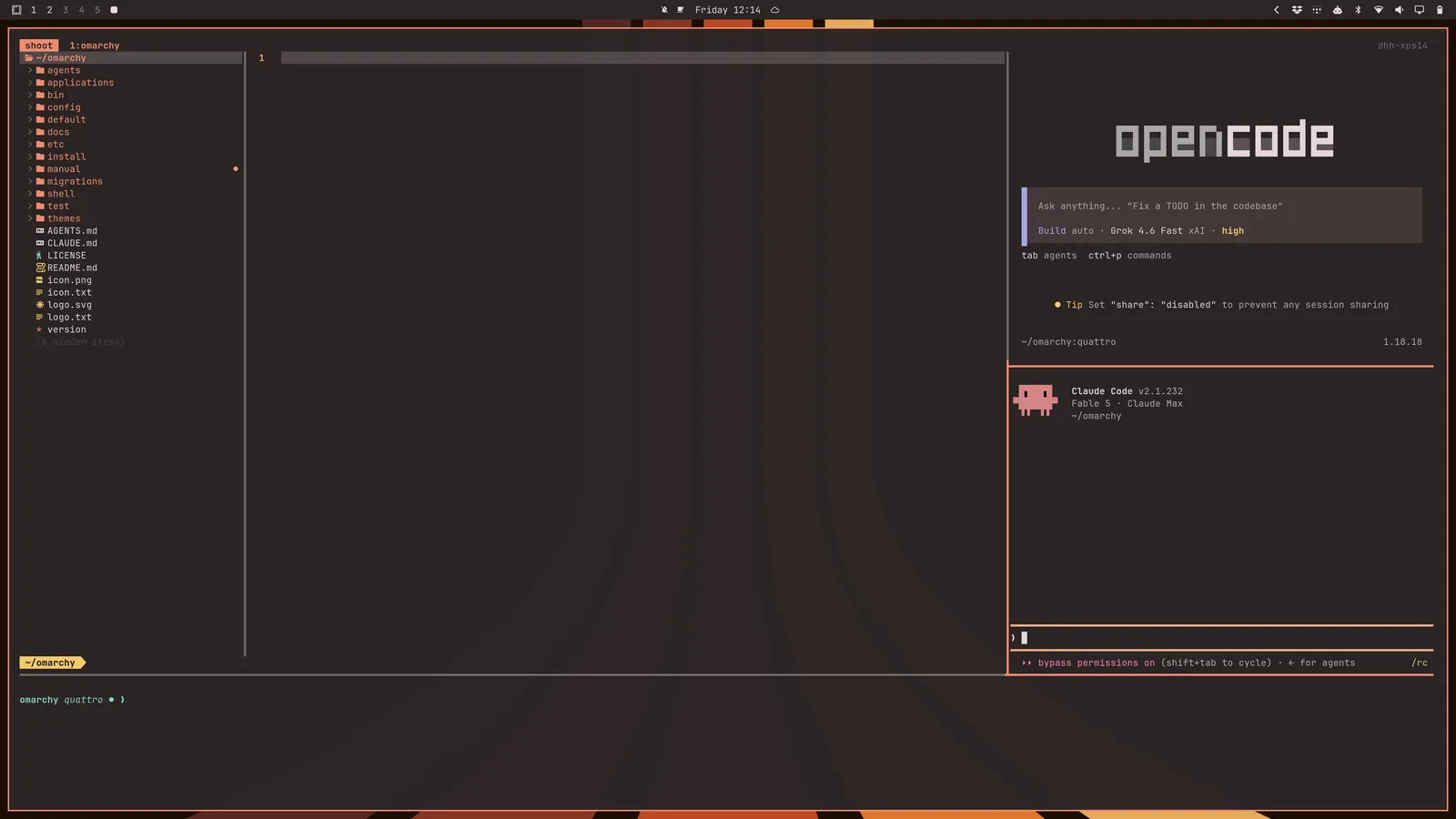
tdl c cx — editor left, OpenCode and Claude Code stacked right, terminal below. One command. Screenshot: Omarchy / 37signals.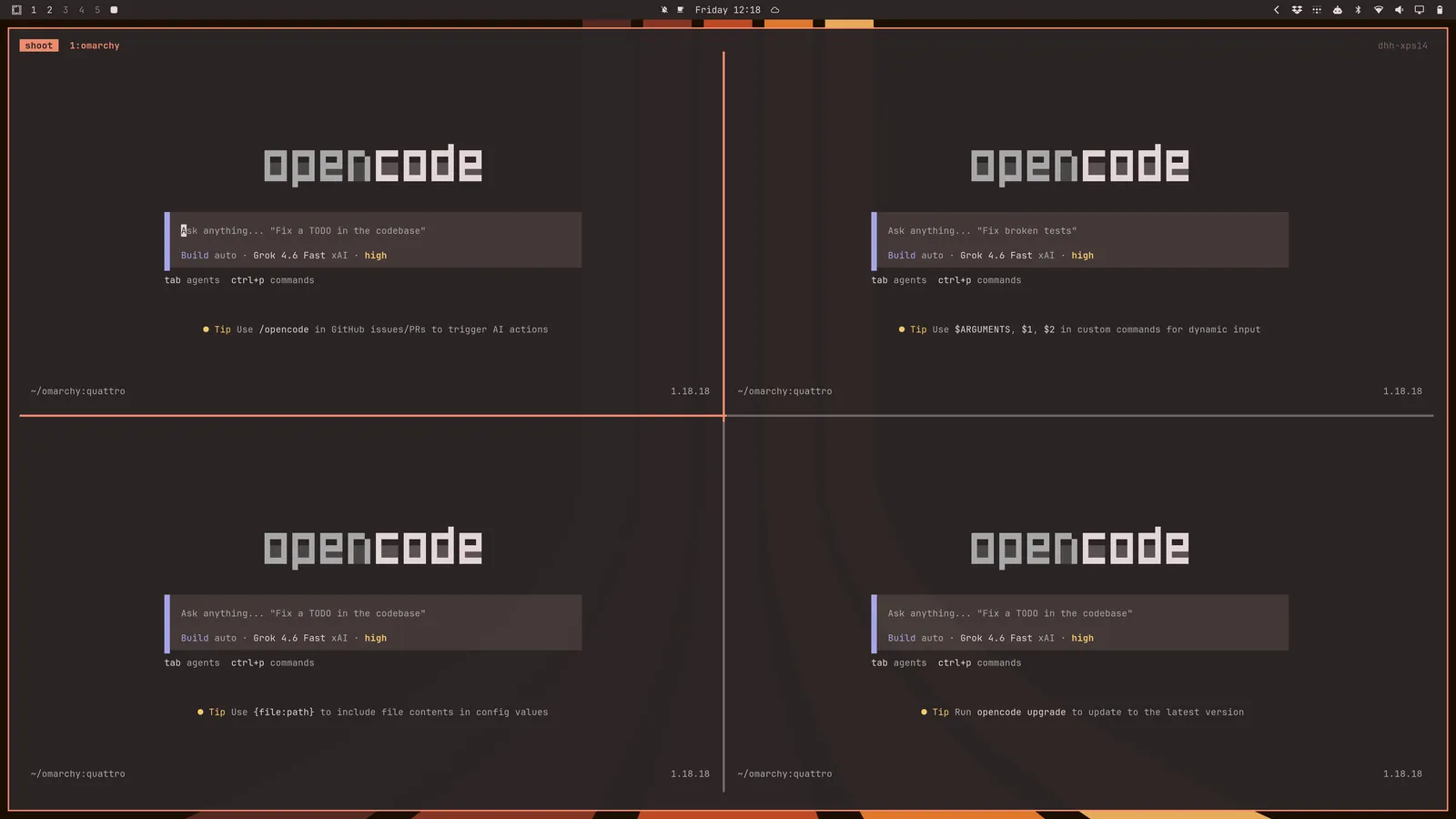
tsl 4 c — four OpenCode agents tiled in one window, each pointed at a different part of the problem. Screenshot: Omarchy / 37signals.What's actually new in 4.0 is tds — a four-way square running your editor, a live diff watcher (hunk diff --watch), a terminal, and OpenCode. A pane whose only job is showing you what changed, while the agent changes it, turns out to be the difference between supervising an agent and hoping.
Herdr
The bigger change is that Omarchy 4 ships a second multiplexer in its base package set: Herdr.
To be clear about provenance, since the naming invites confusion — Herdr is not a 37signals project. It's herdrdev/herdr, Apache-2.0, written in Rust, first committed in March 2026, and around 29,000 stars. Omarchy adopted it; DHH didn't write it.
The premise is the one gap tmux genuinely has in this workflow: tmux has no idea what's running inside a pane. It can't tell you whether Claude Code is still working, blocked waiting on your approval, or finished ten minutes ago. Once you're running three or four agents at once, that's the only thing you actually want to know, and the standard answer is cycling panes to check.
Herdr makes agent state a first-class property — idle, working, blocked, done — surfaced per pane. Omarchy ships it alongside tmux with matching keybindings and a mirrored set of layout functions: hdl, hds, hdlm and hsl do for Herdr exactly what tdl, tds, tdlm and tsl do for tmux. Super + Ctrl + Return launches it; Super + Ctrl + K shows its keybindings, and Super + Alt + K shows tmux's.
Shipping both, with a symmetrical interface, is the right call. You don't have to abandon a decade of tmux muscle memory to try the agent-aware one, and the functions mean switching costs you one keystroke per command.
How we use Omarchy at Code To Cloud
We run Omarchy on development machines here, and the reason is narrower than the aesthetics: it's the agentic stack.
Our working pair is OpenCode alongside Anthropic's Claude Code, which is precisely what tdl c cx assembles in one command — editor on the left, both agents stacked on the right, terminal across the bottom. When a job is parallel rather than paired, tsl turns that into a grid of agents on separate parts of the same problem.
The reason that matters more than it sounds: the layout is a property of the system, not of somebody's dotfiles. It arrives with the machine. Anyone can open a project and get the same arrangement without first inheriting a personal tmux config — which is the whole argument for an opinionated setup, applied to the one workflow we actually care about standardising.
I installed 4.0 the afternoon it dropped, with Akira Yamaoka's Silent Hill 2 remake soundtrack running — fittingly ominous scoring for a from-scratch shell rewrite, and I'd recommend the pairing.
Plugins: changing the desktop without forking it
Almost everything on screen is a plugin inside omarchy-shell. The bar is a plugin. So are the panels, the emoji picker, the clipboard manager, the lock screen, the polkit dialog, and the headless services watching your battery.
The best command in the release is this one:
omarchy plugin clone omarchy.clock
That copies the built-in clock into ~/.config/omarchy/plugins/<you>.clock, renames it "My Clock", enables it, and reroutes anything referencing the original id to your copy — keeping its bar position and settings. Saving any file under that directory hot-reloads it. Break it beyond repair and omarchy plugin remove <you>.clock puts the built-in back.
That's the difference between a configurable desktop and a programmable one. You're not forking the distro to move a widget; you're editing a copy that survives updates.
Third-party plugins are just git repos with a manifest.json:
omarchy plugin add https://github.com/acme/omarchy-weather.git --enable
omarchy plugin validate ./my-plugin
Credit where it's due on the security handling. Before installing anything, Omarchy tells you plainly that plugins run as arbitrary, unsandboxed code inside your long-lived shell process, shows the URL, and makes you confirm. The installer never executes an install hook and never asks for sudo — it clones files, validates the manifest, and flips a bit over IPC. That's the right design, and the warning is accurate rather than reassuring. A bar widget you didn't read has the run of your user account for as long as you're logged in. A community directory has already appeared at omarchyplugins.com; browse it before you write anything, and read it before you enable anything.
Packaging, and what that costs you
The other structural change: Omarchy is now proper Arch packages. ~/.local/share/omarchy becomes a pacman-owned symlink, system files live in /etc and /usr/share/omarchy, and updates flow through pacman. An ALPM guard routes you through omarchy update — bypassable with OMARCHY_ALLOW_DIRECT_PACMAN=1 if you know what you're doing.
This is the maturity step the project needed, and it's the change most likely to bite anyone who'd customised 3.x by editing files in place. If that's you, your edits are in a directory the package manager now owns. Move them to ~/.config/ before you update, not after.
Worth knowing: how the package repo is configured
Packaging the system means the system now comes from a package repository, so it's worth understanding what that repository does and doesn't guarantee. From default/pacman/pacman-stable.conf at the v4.0.0 tag:
[omarchy]
SigLevel = Optional TrustAll
Server = https://pkgs.omarchy.org/stable/$arch
core, extra and multilib inherit the file's SigLevel = Required DatabaseOptional, so your Arch packages are still signature-checked as normal. Omarchy's own repository sets Optional TrustAll instead, and at the time of writing the 198 packages in the stable repo carry SHA-256 checksums but no PGP signatures.
So integrity is covered — HTTPS in transit, checksums in the database — but there's no signature chain back to a signing key. Practically, that means you're trusting the host rather than a key.
This is completely normal for a third-party Arch repo, and the groundwork is clearly there: Omarchy ships an omarchy-keyring package and omarchy update fetches and locally signs a real key, which is exactly what you'd do on the way to signing the repo itself. My guess is that this is a "not yet" rather than a "no".
It's not a reason to avoid Omarchy. It's just the sort of thing worth knowing before you decide which machines it belongs on — and the same project makes you confirm a plugin install by telling you plainly that plugins are unsandboxed code, so the instinct is evidently there.
Privilege escalation moved to pkexec/polkit with a themed prompt showing exactly what's being authorised. Hyprland config converted from .conf to Lua. Generated theme state moved to ~/.local/state/omarchy/current. Apps run in systemd scopes so systemd-oomd can deal with runaway processes rather than taking the compositor down with them.
Should you upgrade, or install fresh?
Already on 3.8.x? Let it come to you. The pacman-based update path is precisely what Quattro rebuilt, and the release has migrations, boot-parameter verification and rollback for partial transitions. Read your customisations first, per above.
Installing from scratch? Use the 4.0 ISO. Installing 3.8.4 today means doing the migration yourself for no benefit.
Only work machine? Give it a few days. This is a from-scratch rewrite of every pixel on the screen, and the release notes' own fix list runs to about sixty entries. Some things will be wrong at 4.0.0, they'll be fixed quickly, and there's no prize for being first.
Tips: the things that catch people out
All of these are from the project's own manual, and between them they cover most of what sends a new Omarchy user to the Discord in the first week.
Before you install
- Secure Boot and/or TPM must be off in BIOS. This isn't optional and it isn't a soft warning — the install won't work otherwise. They're Microsoft schemes aimed at Windows and Microsoft-affiliated distros, and Omarchy isn't one.
- The full-disk install wipes the drive you select. The new free-space option is the one that dual-boots alongside Windows — shrink the partition in Disk Management and turn off BitLocker first.
- Use a wired or 2.4 GHz keyboard. LUKS won't take your password from a Bluetooth keyboard at boot, for the same reason you can't enter a BIOS with one. Discovering this after the install is a bad afternoon.
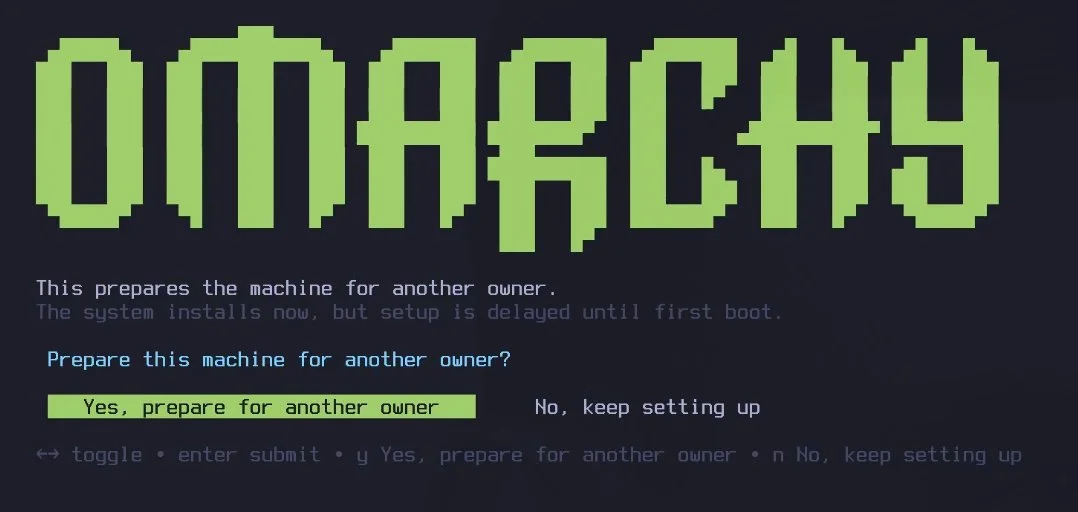
Ctrl + Cis a hidden menu. On the installer's first screen it offers to prepare the machine for someone else, deferring all personal setup to their first boot. On the disk-format confirmation it switches to an install without encryption.
The first hour
- Caps Lock is gone — deliberately. It's remapped to the xcompose key, which is how the emoji and completion shortcuts work. Nothing is broken. If you want it back, remap the compose key in
~/.config/hypr/input.lua. (You can also toggle actual Caps Lock by pressing both Shift keys.) - If every app looks enormous, you're on a 1x display. Omarchy assumes a 2x HiDPI screen. Change
local omarchy_gdk_scale = 2to1in~/.config/hypr/monitors.luaand restart the oversized apps. - Locked out after typing your password wrong? That's
faillock, not a broken install.Ctrl + Alt + F2for a TTY, log in as root, thenfaillock --reset --user <you>.
Living with it
- Never run
pacman -Syuoryay -Syudirectly. You'll skip the pre-update snapshot, the migrations and the config updates. Omarchy actively blocks it and points you atomarchy update— and 4.0 made that guard a real ALPM hook rather than a suggestion. - You get a snapshot on every update, and you can boot into it. Pick it from the Limine boot menu. Two caveats worth internalising before you rely on it: it restores your root filesystem but not
/home, and it leaves~/.configalone — so rolling back an app that changed its config format is still your problem. - Wi-Fi, Bluetooth, audio or trackpad died? Don't reboot. Update > Hardware restarts each subsystem individually and fixes most "it worked five minutes ago" cases.
- Pick your channel deliberately. New installs are on stable, which tracks tagged releases against an Arch mirror deliberately held one month behind upstream so incompatibilities surface before they reach you. Edge and dev exist, and the manual is blunt that you should only run them if you can recover a broken system unaided.
omarchy-debugcollects what the Discord's#omarchy-helpwill ask for. Run it before you write the post asking for help.
Is Omarchy right for you?
It suits you if you want a keyboard-driven tiling desktop without spending a fortnight assembling one, you're comfortable on Arch, and you'll accept someone else's defaults in exchange for coherence. If you're running coding agents for hours a day, the agent layer is a real reason to look now rather than at 4.1.
It doesn't suit you if you need Secure Boot, or if you'd rather make each decision yourself. In that case Fedora Workstation will make you happier and is a perfectly respectable answer. And if you like the idea but you're on a Mac, Kodra macOS covers similar ground — one command, curated terminal, containers and agent tooling — without changing operating systems.
The wider point stands regardless of whether you install it. Omarchy 4 is a shipped, non-trivial desktop environment where the coding agent is a first-class part of the system: it has a place in the bar, a hand in the crash path, and a documented skill for driving the machine. Most tooling is still bolting agents on the side. This is what it looks like when someone builds the seams in deliberately — and if you're weighing up which agent tooling is worth standardising on, that distinction is the one that matters.
It's the most interesting thing to happen to the Linux desktop this year, and the first one that treats coding agents as part of the system rather than something you bolt on afterwards.
FAQ
What is Omarchy Quattro? Quattro is the codename for Omarchy 4, the fourth major version of DHH's Arch Linux and Hyprland desktop. It rebuilds the entire desktop shell in Quickshell as a single long-running process with a plugin architecture, and moves the project's internals from a git checkout to pacman packages.
When was Omarchy 4 released? Omarchy 4.0.0 was released on 14 August 2026. The ISO is available from iso.omarchy.org and is under 6 GB, more than a gigabyte smaller than the 3.x ISO.
Is Omarchy free? Yes. Omarchy is open source under an MIT licence, built by David Heinemeier Hansson and shipped by 37signals.
What is Omarchy based on? Arch Linux, with the Hyprland tiling compositor. From version 4 the desktop shell is built on Quickshell, replacing Waybar, Walker, Mako, SwayOSD, hyprlock, hypridle, swaybg and polkit-gnome.
Can I dual-boot Omarchy 4 with Windows? Yes. Omarchy 4 adds a free-space install option that puts Omarchy in unallocated space alongside Windows, still with LUKS encryption. Shrink your Windows partition in Disk Management first and turn off BitLocker. The full-disk install option still wipes the drive you select.
Which AI coding agents does Omarchy 4 support?
Nine are pre-wired as lazy-loaded launchers: Claude Code, OpenAI Codex, OpenCode, Gemini CLI, GitHub Copilot CLI, Crush, Grok, Pi and Oh My Pi. You set a default with omarchy default agent, and the top bar shows plan usage for Claude Code, Codex and Fireworks.
Should I upgrade to Omarchy 4 from 3.8? If you are already on 3.8.x, let the pacman-based update path bring it to you. If you are installing fresh, use the 4.0 ISO rather than 3.8.4. If it is your only work machine, wait a few days — this is a from-scratch shell rewrite and early point releases will fix real bugs.
What is Herdr, and is it made by DHH?
Herdr is a terminal multiplexer that tracks whether the coding agent in each pane is idle, working, blocked or done — the thing tmux cannot tell you. It is not a 37signals project: it is herdrdev/herdr, Apache-2.0, written in Rust and first published in March 2026. Omarchy 4 ships it in its base package set alongside tmux, with matching keybindings and the mirrored hdl, hds, hdlm and hsl layout functions.
Are Omarchy's packages signed?
Your Arch packages are — core, extra and multilib are signature-checked as normal. Omarchy's own [omarchy] repository at pkgs.omarchy.org is set to SigLevel = Optional TrustAll, and its packages currently carry SHA-256 checksums rather than PGP signatures, so integrity is covered but there is no signature chain. That is normal for a third-party Arch repo, and Omarchy already ships an omarchy-keyring package and signs a key, so the groundwork for signing is in place.
Where this leaves you
If you already run Arch and a tiling compositor, install it and see. If you're running coding agents daily, the agent layer alone justifies the afternoon. Otherwise there's no rush — 4.0.1 will be along shortly.
We use it at Code To Cloud because the workflow it standardises is the one we already run. That's a narrower claim than "you should switch", and it's the only one I'd make on day one.
Fire up the Quattro.
Kevin Evans

Fractional CTO & Founder, Code To Cloud Inc. Kevin Evans is a fractional CTO and technology advisor based in Calgary, Alberta. He builds open-source developer tools and helps startups and growing businesses across Western Canada make smart technology decisions. More about Kevin