Azure landing zones are Microsoft's recommended approach to setting up a secure, scalable Azure environment. With enterprise-scale options and AI-specific architectures now available, choosing the right approach can feel overwhelming. The good news: you don't have to get it perfect on day one. A well-designed landing zone grows with you — and this guide shows you exactly where to start.
This guide breaks down the two main Azure landing zone architectures, compares deployment methods, and helps you decide which landing zone fits your team — whether you're 5 engineers or 500. We've deployed both for organizations across Calgary, Alberta, Western Canada, and beyond, and the patterns are remarkably consistent.
Let's fix that.
Why Your Azure Environment Deserves a Strong Foundation
Before we compare architectures, it's worth understanding why teams invest in a landing zone in the first place. Without one, the same patterns tend to emerge:
- No governance = shadow IT. Without management groups, policies, or tagging standards, teams create resources wherever they want. Subscription sprawl follows. Nobody knows what's running, who owns it, or what it costs.
- Security bolted on later. Identity governance, network segmentation, and Zero Trust controls are orders of magnitude easier to build in from day one than to retrofit onto production workloads.
- No standards = no auditability. Every team builds differently. RBAC varies by subscription. When SOC 2 or ISO 27001 arrives, the environment can't demonstrate control.
- Over-engineering too early. Some teams invest months in enterprise infrastructure before shipping a feature. Your landing zone should match your current needs — and be ready to grow with you.
A landing zone solves all four problems — but only if you pick the right tier. Governance should be an enabler, not a tax. The right landing zone gives your teams guardrails that accelerate delivery instead of slowing it down.
What Is an Azure Landing Zone?
An Azure landing zone is Microsoft's standardized approach to setting up a secure, scalable Azure environment. Think of it as the infrastructure blueprint you deploy before any workloads go live — governance, security, networking, identity, and cost management, all baked in from day one. It's part of Microsoft's Cloud Adoption Framework (CAF), which provides the full methodology for cloud readiness.
Here's what the enterprise reference architecture actually looks like:
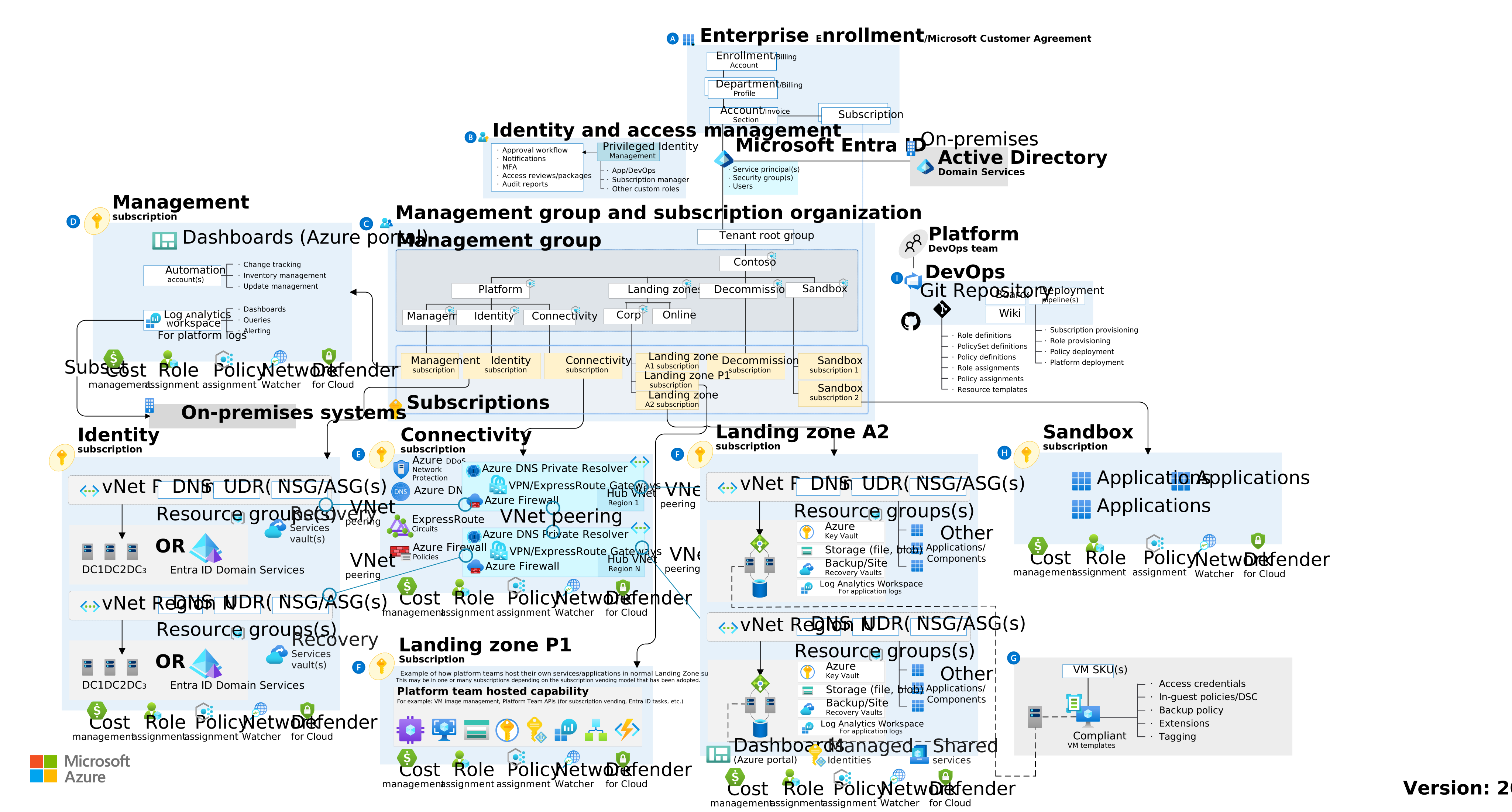
Azure Landing Zone reference architecture (hub-spoke) — Source: Microsoft Cloud Adoption Framework
If that diagram made you think "this is a lot" — you're right. It is. The full architecture covers eight design areas: Azure billing and Microsoft Entra tenant, identity and access management, management group and subscription organization, network topology and connectivity, security, management, governance, and platform automation/DevOps. Each area has design considerations and recommendations that affect every subscription you create.
The landing zone journey itself has four phases: (1) bootstrap your environment with subscriptions, (2) deploy platform landing zone components (management groups, policies, connectivity, monitoring), (3) set up subscription vending for application teams, and (4) deploy application landing zone components for individual workloads.
The good news: you don't necessarily need all of this. That's exactly why there are two deployment models — an Azure Landing Zone for your platform foundation and an AI Landing Zone for Foundry workloads.
An Azure landing zone is a standardized, pre-configured Azure environment based on Microsoft's Cloud Adoption Framework (CAF). It provides the foundational building blocks — governance, security, networking, and identity — that every workload needs before you deploy a single virtual machine, container, or AI model.
Think of it as the infrastructure blueprint you deploy before any workloads. Without one, teams end up with subscription sprawl, inconsistent security policies, no cost visibility, and networking that looks like it was designed by committee (because it was).
Landing zones come in two flavors:
- Platform landing zones — Shared services that every workload depends on: identity, networking, management, security. Usually owned by a platform or infrastructure team.
- Application landing zones — Workload-specific environments that sit on top of the platform. Each application team gets a subscription (or set of subscriptions) with guardrails already in place.
The key insight is that landing zones aren't optional nice-to-haves. They're the difference between "we can onboard a new team in 30 minutes" and "it takes 6 weeks and a Jira epic to get a new subscription approved." The question isn't whether you need one — it's which one.
Two Azure Landing Zone Architectures
There are two Azure landing zone architectures worth understanding. The first is your platform foundation — the governed Azure environment every workload depends on. The second is an AI-specific layer purpose-built for Microsoft Foundry deployments. Here's what each looks like in practice.
Azure Landing Zone (Platform Foundation)
This is Microsoft's flagship reference architecture — the Cloud Adoption Framework implementation you see in every Azure architecture center diagram. It's the industry standard, and it scales from startups to enterprises. We right-size the deployment for your organization.
What you get:
- A management group hierarchy aligned to your organization
- Hub-spoke networking with Azure Firewall, Azure DNS Private Resolver, and optional ExpressRoute or VPN for hybrid connectivity — or alternatively, Azure Virtual WAN (vWAN) for a Microsoft-managed hub topology
- Zero Trust identity foundation with Entra ID, RBAC at every scope, Conditional Access policies, and Privileged Identity Management (PIM)
- Azure Policy at scale — covering Microsoft Cloud Security Benchmark (MCSB), tagging, allowed regions, and resource constraints
- Log Analytics, Microsoft Defender for Cloud, and Microsoft Sentinel for centralized management, monitoring, and threat detection
- Subscription vending — automated creation of new landing zone subscriptions with guardrails pre-applied
How we right-size it: A 10-person startup doesn't need 8 management groups and 200 policy assignments. We deploy the same proven architecture at the right scale — simpler governance and flat networking for early-stage teams, full hub-spoke with subscription vending for enterprises. The foundation grows with you without rearchitecting.
Deployment: Azure Verified Modules (Bicep or Terraform) or the Azure Portal accelerator. The Terraform implementation is maintained as a purpose-built module (caf-enterprise-scale). Bicep uses Azure Verified Modules.
Pros:
- Full Zero Trust architecture with comprehensive governance that satisfies SOC 2, ISO 27001, and most regulatory frameworks
- Proven at enterprise scale — Microsoft's own internal teams use this architecture
- Fully supported by Microsoft with regular updates and community calls
- Subscription vending means you can onboard new teams in minutes, not weeks
- Scales from startup to enterprise without rearchitecting
Cons:
- The full reference architecture has many moving parts — but you only adopt what you need today
- Hub networking adds cost, so right-size your network tier to match your current traffic
- At enterprise scale, a dedicated platform team helps — smaller teams can start lean and grow into it
Best for: Every organization that uses Azure — from Calgary startups to enterprises with hundreds of engineers. We deploy the same proven architecture at the right scale for your team, compliance needs, and growth trajectory.
AI Landing Zone (Microsoft Foundry)
The AI Landing Zone is purpose-built for teams deploying AI workloads on Azure — specifically Microsoft Foundry. It's technically an application landing zone that layers on top of your Azure Landing Zone (or runs standalone), and it solves problems that the platform foundation doesn't address.
The reference implementations live in the Azure/AI-Landing-Zones GitHub repository and include two primary architectures:
- AI Landing Zone for Foundry — Deploys Microsoft Foundry with private networking, managed identities, and all the supporting infrastructure (Azure OpenAI, AI Search, Cosmos DB, Key Vault, Storage) behind private endpoints
- AI Landing Zone for APIM (AI Gateway) — Adds Azure API Management as an AI gateway in front of your AI services for load balancing, rate limiting, token tracking, and multi-model routing
What you get:
- Secure Microsoft Foundry integration with private networking end-to-end
- Azure Verified Modules-based IaC (Bicep and Terraform)
- Private endpoints for all data-plane operations — no AI traffic traverses the public internet
- Pre-configured monitoring with Azure Monitor and Application Insights
- Alignment with CAF AI Scenario guidance and Well-Architected Framework AI workload recommendations
- Support for RAG pipelines, conversational agents, document processing, and content generation use cases
Deployment: Bicep, Terraform, or Portal ("Deploy to Azure" button). Deploys in hours depending on private DNS zone propagation.
Best for: Any team deploying AI workloads on Azure — particularly Foundry-based agents or RAG pipelines that need private networking, token governance, and Responsible AI guardrails. Deploy it standalone or layer it on top of your Azure Landing Zone.
Landing Zone Comparison Table
Here's a side-by-side comparison to make the differences concrete:
| Feature | Azure Landing Zone | AI Landing Zone |
|---|---|---|
| Purpose | Platform foundation (governance, networking, identity) | AI workload infrastructure (Foundry, private AI) |
| Scales to | Startups through enterprises (right-sized) | Any team deploying AI on Azure |
| Deploy time | Days to weeks (scope-dependent) | Hours |
| Bicep / Terraform | Both supported | Both supported |
| Hub networking | Hub-spoke or vWAN (right-sized) | Private endpoints |
| Hybrid connectivity | ExpressRoute / VPN when needed | Optional |
| AI-specific services | Add AI LZ on top | Foundry, APIM, AI Search |
| Management groups | Multi-level hierarchy (right-sized) | N/A (application LZ) |
| Governance depth | Scales from minimal to full (200+ policies) | AI workload focused |
| Composability | Standalone platform | Standalone or layered on Azure LZ |
Not sure which architecture fits your team?
We'll assess your requirements and recommend the right landing zone in a free 30-minute call.
Book a Free AssessmentHow to Choose: A Decision Framework
After deploying landing zones for dozens of organizations — from startups in Calgary to enterprises across Western Canada and beyond — here's the decision framework that actually works:
Start with these questions:
- Do you use Azure? If yes, you need an Azure Landing Zone. The only question is how much governance you need right now.
- Are you building AI workloads? If you're deploying Microsoft Foundry, RAG pipelines, or AI agents, add the AI Landing Zone — standalone or on top of your Azure LZ.
- Do you need hybrid connectivity? If you're connecting to on-premises data centers, you need hub-spoke or vWAN networking. Choose hub-spoke for more control or Azure Virtual WAN for simpler multi-branch connectivity.
- Are you in a regulated industry? Finance, healthcare, and government typically need the full policy set to satisfy compliance requirements.
The decision tree:
- Any company on Azure → Azure Landing Zone (right-sized). Same proven CAF architecture, scaled to your team and compliance needs.
- Building AI products → Add the AI Landing Zone for private Foundry integration, token governance, and Responsible AI guardrails.
- Regulated industry or hybrid connectivity → Full-scope Azure Landing Zone with hub-spoke/vWAN, 200+ policies, and subscription vending.
- Need both platform + AI → Deploy the Azure Landing Zone as your foundation, then layer the AI Landing Zone on top. They're designed to work together.
The most common mistakes we see:
- No landing zone at all. A growing company with 30 engineers and zero governance — everything in one subscription, no policies, no logging, no budget alerts. They find out about their cloud strategy mistakes when the first surprise bill hits or the first security incident happens.
- Over-engineering too early. A 10-person startup deploying hub-spoke networking with Azure Firewall, 8 management groups, and PIM. They spend 3 months on infrastructure before shipping a feature. A right-sized deployment would have taken days.
- Treating AI workloads like regular workloads. Deploying Azure OpenAI with a public endpoint, no private networking, no token monitoring, and no content safety filters. The AI Landing Zone exists specifically to prevent this.
Deployment Methods: Bicep vs Terraform vs Portal
Both landing zones support Infrastructure as Code (IaC), but the tooling choices matter more than most teams realize. Here's an honest comparison.
Bicep
Bicep is Azure's native IaC language — it compiles to ARM templates but is dramatically more readable. If your organization is all-in on Azure with no plans for multi-cloud, Bicep is the natural choice.
- First-class Azure support — new resource types are available in Bicep on day one
- Azure Verified Modules provide tested, Microsoft-maintained building blocks
- No state file to manage (Azure Resource Manager is the state store)
- Tight VS Code integration with IntelliSense, validation, and deployment visualization
- Smaller community than Terraform, but growing rapidly
Terraform
Terraform is the industry standard for multi-cloud IaC. If you use (or plan to use) AWS, GCP, or other cloud providers alongside Azure, Terraform gives you one language for everything.
- Massive community and module ecosystem
- Mature state management with remote backends (Azure Storage, Terraform Cloud)
- Plan/apply workflow makes changes predictable and reviewable
- Multi-cloud support is genuine — same language, same workflows
- AzureRM provider sometimes lags behind new Azure features by weeks or months
Portal Accelerator
The Portal accelerator is a guided wizard in the Azure Portal that deploys the enterprise ALZ (or AI landing zone) through a visual interface. No IaC knowledge required.
- Visual and approachable — great for initial exploration
- Deploys a complete landing zone without writing code
- Not reproducible. You can't version-control a portal deployment, can't review it in a PR, and can't deploy it consistently across environments
- Creates configuration drift the moment someone makes a manual change
Our recommendation: IaC from day one. Even if you start with the portal accelerator to explore, convert to Bicep or Terraform before going to production. Portal deployments create tech debt that compounds faster than you'd expect. The Azure Landing Zone is best deployed via IaC — portal deployments create drift that compounds over time.
What Happens After Deployment?
Deploying the landing zone is step one. Governance isn’t a gate — it’s an accelerator. The landing zone gives you the foundation — but you still need to build on it. Here's the day-1 checklist that most teams miss:
Identity & Access:
- Configure Entra ID with your organization's directory
- Set up break-glass accounts (emergency access accounts that bypass MFA/Conditional Access)
- Create security groups for RBAC assignments — never assign roles to individual users
- Assign RBAC roles at subscription scope: Owner (platform team only), Contributor (application teams), Reader (everyone else)
- Enable Privileged Identity Management (PIM) for just-in-time access (enterprise ALZ)
CI/CD:
- Set up Workload Identity Federation for GitHub Actions or Azure DevOps — no more service principal secrets
- Create separate service connections for each environment (dev, staging, production)
- Implement branch protection and required reviewers for infrastructure changes
Cost Management:
- Configure budget alerts at the subscription level (start with 80% and 100% thresholds)
- Set up cost anomaly detection in Microsoft Cost Management
- Tag everything — at minimum: environment, team, cost-center, and application
Security & Zero Trust:
- Review and remediate Microsoft Defender for Cloud recommendations (start with High severity)
- Enable Defender plans for the resource types you're using (App Service, Storage, Key Vault, etc.)
- Configure diagnostic settings to send audit logs to your Log Analytics workspace
- Set up alert rules for critical security events (failed sign-ins, privilege escalation, resource deletions)
The landing zone gives you the guardrails. These day-1 tasks make the guardrails actually work.
Need Help? We Deploy Landing Zones.
At Code To Cloud, we've deployed Azure Landing Zones and AI Landing Zones for organizations ranging from 3-person startups to enterprises with hundreds of engineers. We're a technology advisory company based in Calgary, Alberta, serving startups, growing businesses, and enterprises across Western Canada and beyond.
Here's what a typical engagement looks like:
- Assessment — We evaluate your current Azure environment (or lack thereof), team size, compliance requirements, and roadmap
- Architecture decision — We recommend the right landing zone tier and deployment method based on your actual needs, not a theoretical ideal
- Deployment — We deploy the landing zone with IaC (Bicep or Terraform), complete the day-1 checklist, and hand off a documented, reproducible environment
- Knowledge transfer — Your team gets trained on how to operate, extend, and graduate the landing zone as you grow
We also offer ongoing fractional CTO advisory for teams that want continued architecture guidance without hiring a full-time CTO. Learn more about our Azure Landing Zone deployment services.
Whether you're a Calgary startup getting your first Azure subscription in order or an enterprise preparing for a cloud migration, the right landing zone saves you months of rework and thousands in wasted spend.
Ready to figure out which landing zone is right for you?
Book a free landing zone assessment →
Further Reading
- Azure Landing Zones — Cloud Adoption Framework (Microsoft Docs)
- Azure Landing Zone (Enterprise-Scale) on GitHub
- AI Landing Zones (GitHub)
- Azure Verified Modules
- CAF + Foundry + Azure AI Landing Zones: The Fast Track to Enterprise AI — our deep dive on the AI landing zone specifically
- Cloud Strategy Mistakes — common pitfalls that the right landing zone prevents
— Code To Cloud Team